Back to Resources

How Tacton’s 3D Product Configurator Solves These Manufacturing Sales Challenges

A 3D product configurator gives manufacturers a faster, more accurate, and more intuitive way to sell complex products by dynamically visualizing every configuration. Learn how Tacton's visualization capabilities embedded in CPQ accelerate your sales.

How Tacton’s 3D Product Configurator Solves These Manufacturing Sales Challenges

Highly configurable products are difficult to communicate, whether they’re being communicated from engineering to sales or from sales to the buyer. Buyers want convenience and ample information before they speak to sales, but more information upfront also makes the experience more complicated. Visual configurators and 3D product configurators create an intuitive experience, so that buyers can be sure they’re making the right decision despite your product’s high configurability.  

Visual configuration in Tacton CPQ (configure, price, quote) makes it easier to remove friction in the sales process and differentiate your buyer experience from your competitors. Learn how to tackle your common sales challenges with CPQ visualization tools.  

What Is Visual Configuration in Manufacturing? 

Visual configuration is an interactive product tool that is often part of the configure, price, quote process and software. Sometimes called a 3D product viewer or online product builder, it uses technology that allows sales and end-buyers to see the product they are customizing in real-time, including the variants, accessories, and even colors they choose. 

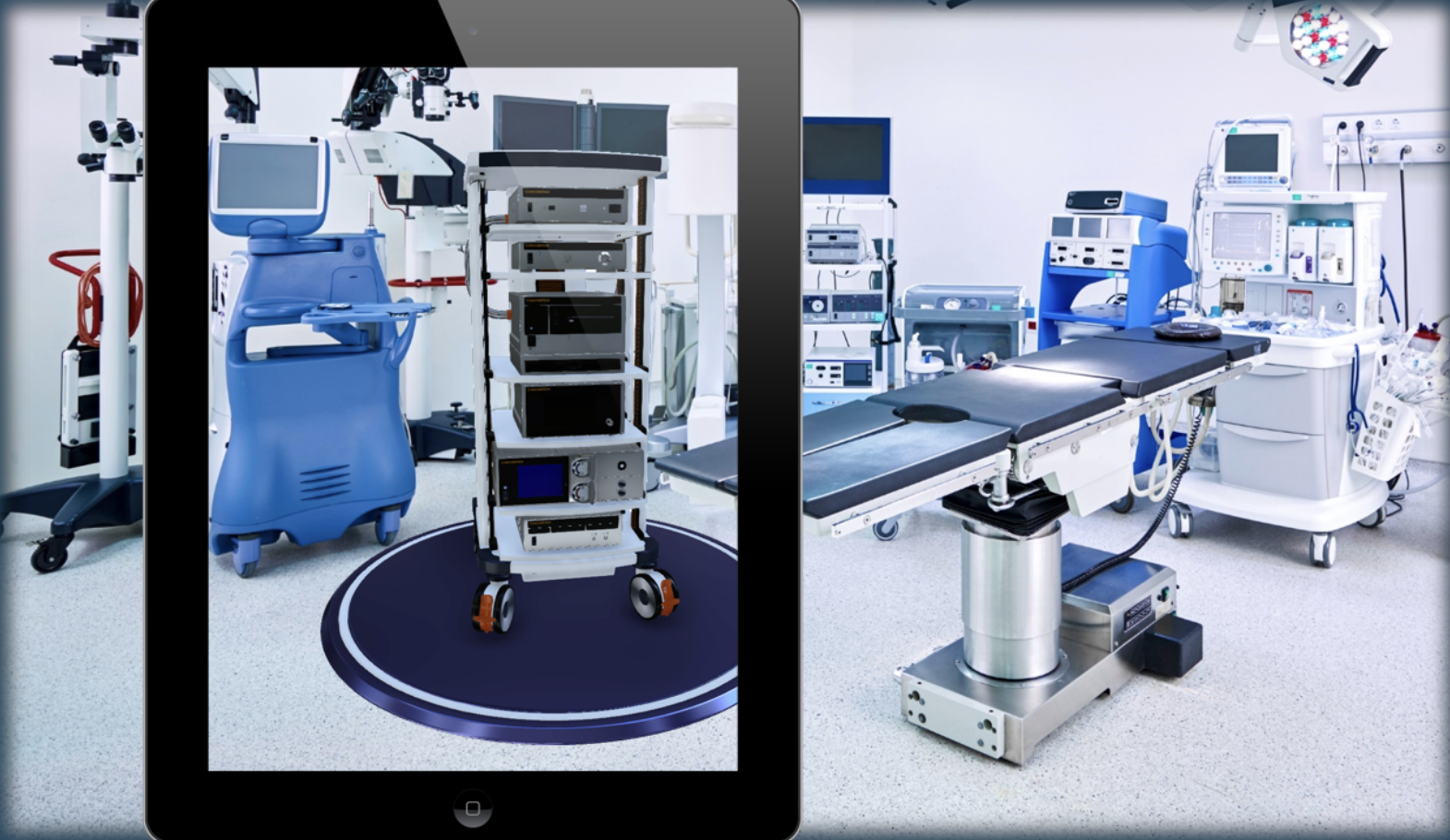
Tacton’s visualization and 3D product configurator is natively integrated within Tacton CPQ’s configuration engine, unlike third-party tools that require separate connections. The visualization tool uses augmented reality, scaling models placed in real environments via a QR code or mobile link. The AR changes dynamically, in real time as the configuration changes. 

Buyers can be sure they’re creating the right product with the right fit in their operational workspace, and they can manipulate the product (e.g., rotate, zoom, etc.) for more visual context. 

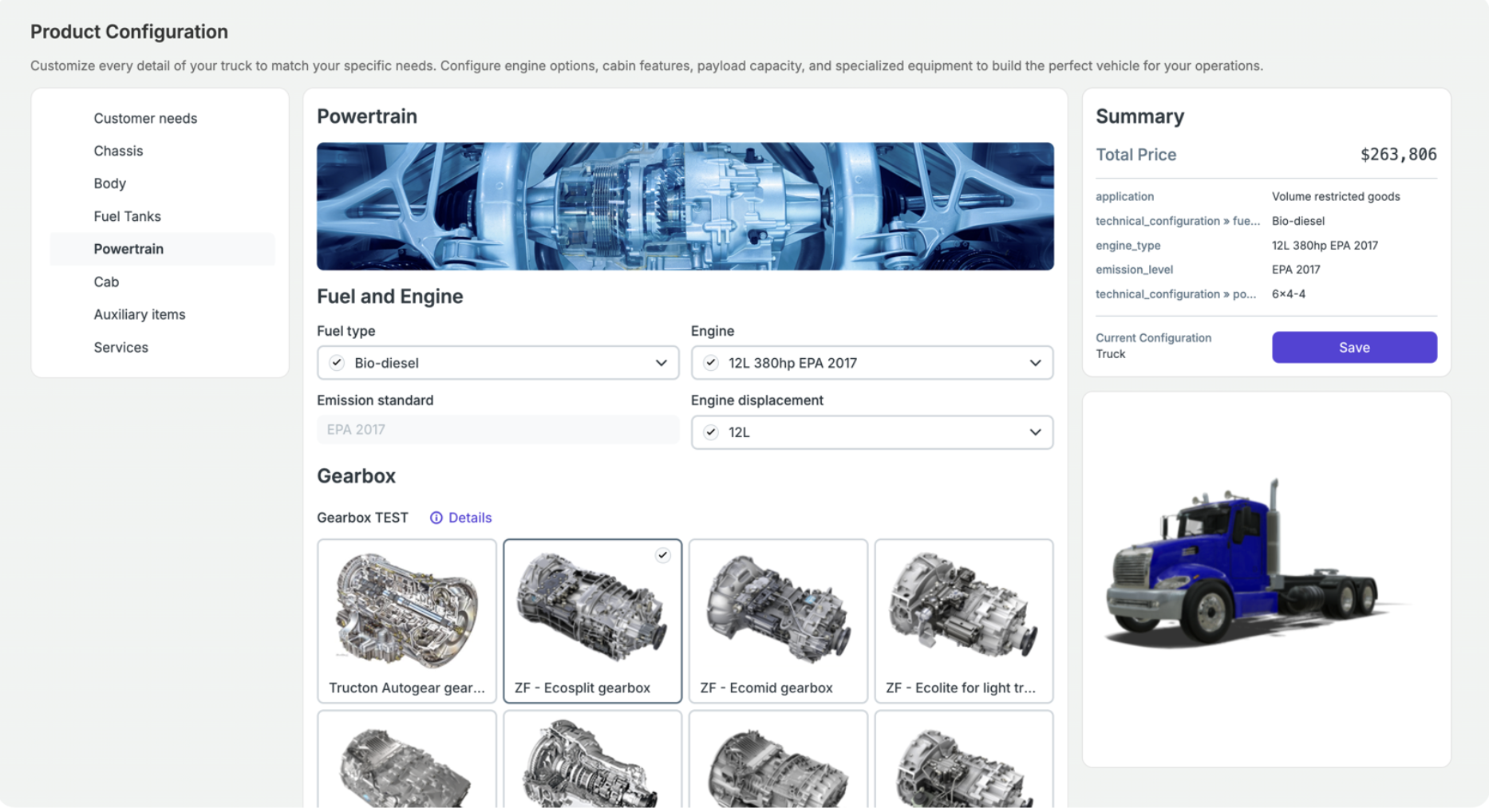
Visual configuration heavy vehicles

What is layout planning visualization? 

For space planning scenarios, visual configuration can also support layout planning, which allows users to upload floor plans, place multiple components in a space, and validate fit without involving engineering. Tacton’s layout planning capabilities, for example, are especially helpful for manufacturers selling construction or building materials or industrial equipment for factories, where procurement requires strong visualization.  

How 3D product configurators work  

A 3D configurator isn’t a standalone visualization tool. It renders a visual representation based on the same product logic, constraints, and configuration rules in the CPQ system.  

The system pulls parametric values and updates the 3D model using pre-prepared visual assets. Visualization supports simple, pre-defined parametric changes (such as length or height) when modeled in advance. CAD assets are used initially and converted to lightweight FBX models for Tacton ahead of time, and the visualization updates from these prepared assets. 

When a user selects an option, the CPQ’s constraint engine validates the choice and sends back: 

  • Allowed options 
  • Blocked/invalid options 
  • Updated price 

Static images generated from predefined 3D camera angles can be automatically included in the proposal. 

It’s important to remember that visual configuration supports guided, rules-based visualization for quoting and sales, but it’s not a replacement for CAD. It doesn’t provide the depth of engineering-level precision or fully dynamic parametric modeling. 

The manufacturing challenges that visual configuration helps solve  

Visual product configurators reduce sales friction and streamline the buyer’s decision making by solving for these common bottlenecks: 

Buyers don’t understand their options 

Many B2B buyers today are not technical buyers. They need to see the solution in order to understand what it looks like, how it fits, and whether it’s compliant in their space. Without seeing it, they may delay their choice or create scope creep as changes and add-ons are requested post-quote.  

A 2D or 3D product viewer removes ambiguity. It builds confidence in your buyer and empowers them with more information without overwhelming them.  

Sales struggles to communicate complex variants 

Not all sales reps are technical experts, either. It’s much harder to effectively sell capital equipment when relying on PDFs, static images, or CAD screenshots that may be difficult to understand. Work happens in motion, and being able to use 3D or augmented reality in your onsite meetings or sales conversations makes you look like an expert.  

Engineering is pulled into every quote early in the sales cycle 

Selling highly configurable products means that engineering is tightly involved, especially in custom, engineer-to-order products. That means engineers spend a large portion of their hours supporting sales with feasibility checks. Visual configuration that’s embedded in CPQ ensures only buildable configurations are visualized, and buyers, sellers, and engineers are not navigating unbuildable solutions. Instead, engineering can focus on CAD and design work for special projects and new models.  

Quotes are slow and error-prone 

The longer it takes for your team to provide a quote, the more opportunity a faster competitor has to win their business. Between lack of accuracy and long delays while sales and engineering communicate, a buyer can become uninterested.  

Visual configuration eliminates interpretation errors between sales and engineering as well. Engineering often has to interpret what the customer wanted. 

Visual configurators eliminate this by providing: 

  • A shared, visual “source of truth” 
  • Dimensions and components 
  • Automatically generated, validated BOMs and configuration data alongside the CPQ 

Buyers are not engaged 

Buyers want an easy, Amazon-like experience when they buy. Visual configuration is a valuable feature of an e-commerce or online sales experience, presenting products in a similar way that B2C buyers explore products online.

3D product configurators embedded in CPQ also give you the ability to take screenshots of visualizations and export them into engaging, visual proposals that make your business stand out and empower your customers with the confidence to buy.  

Sales and approvals require multiple stakeholders 

Visualization helps align diverse stakeholders early in the buying process. 

Decision-making and sales cycles becomes faster when all stakeholders can see the same configured product rather than relying on static descriptions or assumptions.  

This is especially valuable when procurement requires input from operations, engineering, finance, facilities, safety teams, surgeons or medical staff in medtech equipment, dealer networks, or IT.  

Customization comes at the cost of efficiency 

Manufacturers want to sell customizable products without becoming engineer-to-order on every deal. With modular product models, you can standardize configurable options, present them visually, and keep customization and variability under control. This supports mass customization at scale.  

Sales onboarding takes too much time 

Visual configuration equips your sales reps, dealer reps, and new hires, so they can provide more information with less knowledge. 3D visualization, for example, dramatically reduces onboarding time, as valid configurations are automated, and ensures quoting consistency.  

Dealers and partners don’t have strong customer-facing tools 

Dealers are often stuck with outdated tools that don’t highlight your brand the way you need. A customer-facing product demo with interactive visuals is a major differentiator for your sales partners. Tacton’s visual configurator works in dealer portals and self-service omnichannel sales, so your distribution network can streamline sales of your products.  

How to implement visual configuration: what manufacturers need to know 

  • Prepare CAD data: Ensure clean, simplified visual assets and CAD models for the products you want to visualize. Tacton reuses your existing CAD, rather than requiring rebuilds.  
  • Connect CAD to CPQ rules: Link CAD parameters to your product logic so the 3D model always reflects a valid configuration. Tacton keeps everything aligned in one product model. 
  • Convert and optimize 3D assets: CAD files are transformed into lightweight, web-friendly geometry for fast loading and real-time updates. 
  • Configure the visual experience: Define how the model behaves during configuration, such as what updates dynamically, what moves, and what customers can interact with. 
  • Deploy in the cloud: Tacton’s SaaS platform manages hosting, scaling, and asset storage automatically, with optional PLM/PDM integration to keep models up to date. 

Visual product configuration is becoming a standard 

With automated drawings, error-free quotes, and a buying experience that sets you apart, Tacton helps you accelerate sales while removing friction across engineering and operations. If you’re ready to reduce rework, protect margins, and bring your complex products to life for your buyers, learn more about our buyer engagement capabilities.  

Learn More About Tacton Buyer Engagement

Back to Resources

5 Benefits of Configure-to-Order Manufacturing and When to Adapt to CTO

Learn how configure-to-order (CTO) solutions help manufacturers deliver customized products faster and how it differs from engineer-to-order.

5 Benefits of Configure-to-Order Manufacturing and When to Adapt to CTO

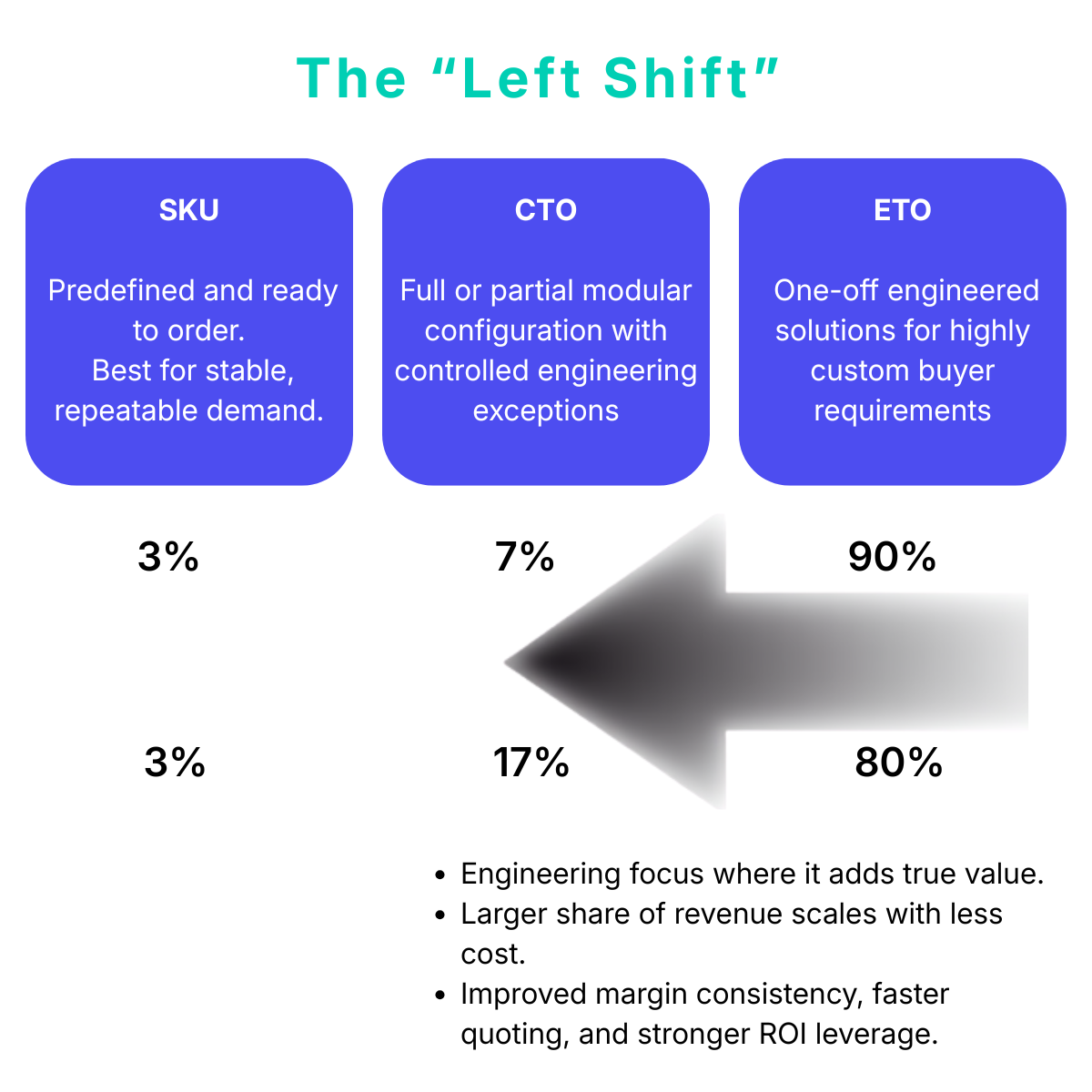
Customization is now a baseline for customers buying complex industrial equipment, but how it’s delivered makes a difference. Engineer-to-order (ETO) gives manufacturers full flexibility to meet unique customer requirements, and for certain highly complex or regulated products, it remains the right fit. But as demand for tailored solutions increases, relying solely on ETO slows down the sales cycle and leaves less room for margin predictability. Configure-to-order (CTO) offers an efficient way to deliver customization that doesn’t require reinventing the wheel with every order.

That’s why many manufacturers are re-evaluating their mix. By introducing CTO where repeatable configurations are possible, manufacturers can shorten lead times and reduce engineering effort, while still meeting customer expectations.

What is configure-to-order (CTO) in manufacturing?

Configure-to-order (CTO) manufacturing is a production approach where customers choose from a set of predefined, modular components to create a tailored product without requiring new engineering work for each order. Instead of starting from scratch or relying on rigid, one-size-fits-all stock, sellers assemble valid configurations from modules that are already designed, tested, and ready to go, like LEGO for manufacturers. This allows customers to get exactly what they need more quickly.

CTO sits between two traditional approaches: engineer-to-order (ETO), where each project requires custom design and long lead times, and made-to-stock (MTS), which offers speed but little flexibility.

How does it work?

Behind the scenes, engineering teams define the rules or constraints that govern how these components can be configured. This work happens upfront—often in a configure, price, quote (CPQ) software—so it doesn’t need to be repeated for each order. Once in place, the seller can use this system to automatically check for compatibility, generate pricing or 3D drawings, create a bill of materials (BOM), and send the configuration to production. This reduces reliance on engineering during the sales process and streamlines handoff to manufacturing.

Benefits of configure-to-order in manufacturing

For manufacturers balancing complexity with efficiency, CTO solutions deliver compelling benefits:

1. Faster quoting and delivery

Manufacturers can quickly generate accurate quotes and fulfill orders faster with predefined components than with ETO. In a traditional engineer-to-order process, every quote kicks off a mini project that pulls in engineering for feasibility checks, custom drawings, and manual estimation, which stretches lead times and slows down sales cycles.

In CTO manufacturing, product logic and modular options are defined upfront and sellers pull from a library of valid combinations instead of starting from scratch.

2. Improved operational efficiency and scalability

Repeatable modules and standardized logic make it easier to scale operations and support global growth. When every order is bespoke, operations teams struggle to plan capacity, inventory, and staffing, and it becomes difficult to standardize processes across plants, regions, or dealer networks.

By contrast, configure-to-order manufacturing can be replicated across multiple plants and channels. Because the logic is defined once and reused across deals, manufacturers can scale to more markets, more channels, and more sellers without adding proportional engineering or operations headcount.

3. Greater engineering efficiency and accuracy 

CTO minimizes the need for engineering resources on each order, freeing teams to focus on innovation and high-value custom work. Standardized components and logic also reduce the risk of design or configuration errors and costly rework.

Instead of reviewing every configuration, engineering defines the allowable combinations once in CPQ. From there, sales can configure valid solutions independently without risking non-compliant builds.

4. Better cost and margin control

With fewer unknowns and less variability, manufacturers gain clearer insight into costs and pricing. When every order is engineered from scratch, costing can become unpredictable and scope creep can quietly erode margins.

Configure-to-order manufacturing helps manufacturers bring more discipline to cost and margin control. Standardized modules typically have known cost structures, and predictable BOMs lead to more accurate costing and a better ability to quote profitable deals quickly and to forecast revenue.

5. Meaningful customization 

Customers get tailored solutions that meet their needs without delays or compromises in quality. A common concern about configure-to-order manufacturing is that it might limit flexibility, but in practice CTO is about channeling flexibility rather than eliminating it.

Customers can still choose key dimensions, features, and options that matter most, while the underlying architecture ensures these choices align with what can be produced efficiently and reliably.

In practice, many companies benefit from both an ETO and CTO model: highly complex or one-off projects may remain in the ETO domain, while more repeatable or core offerings transition to CTO. This dual-track approach allows manufacturers to preserve flexibility while reaping the operational efficiencies of standardization.

Engineer-to-order vs. configure-to-order: What’s the difference?

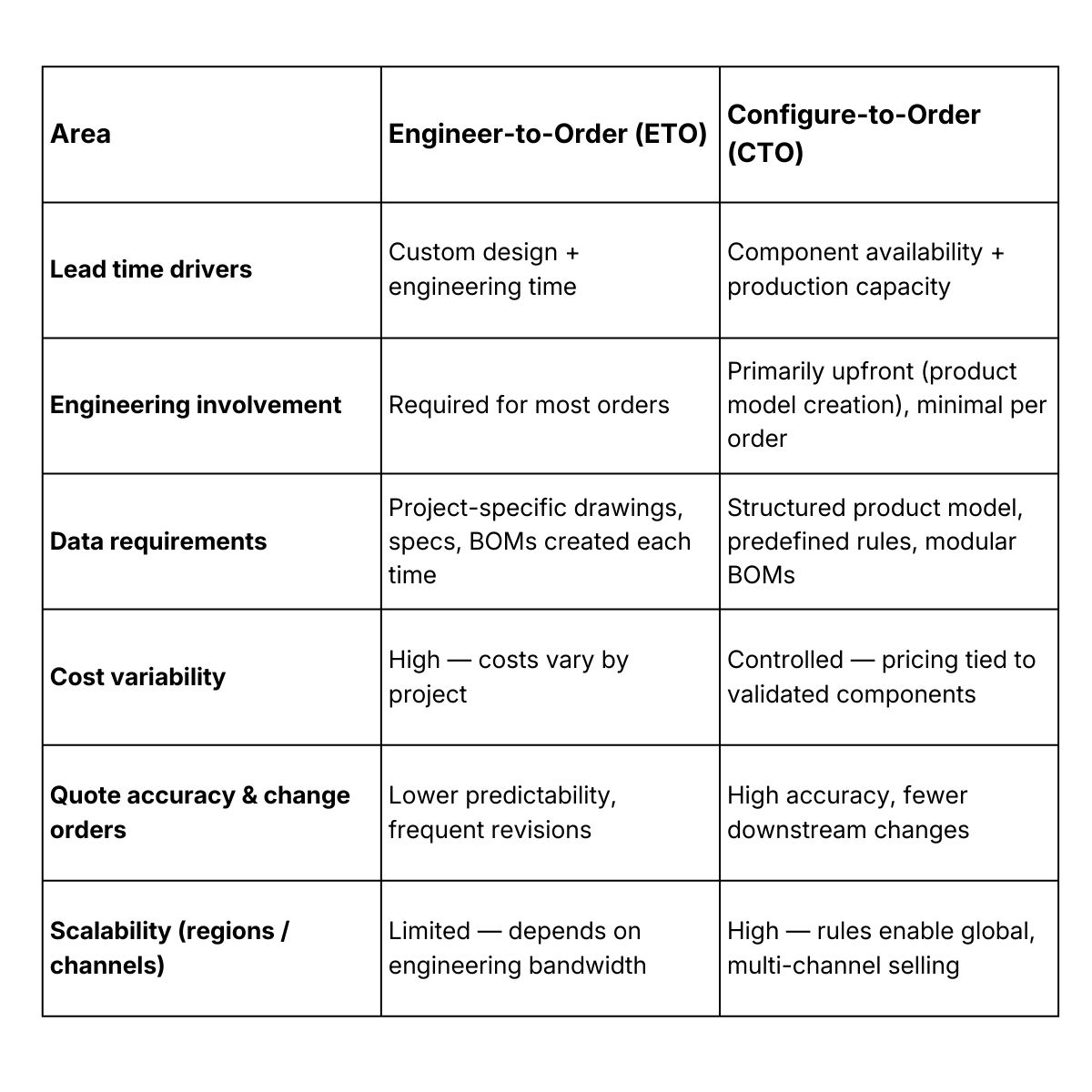
While ETO and CTO both aim to deliver results aligned with customer requirements, their execution differs markedly:

Feature Engineer-to-order (ETO) Configure-to-order (CTO)
Customization level Fully custom, engineered from scratch Modular customization using predefined parts
Engineering involvement Required for every order Minimal on a per-order basis
Quote complexity Each quote requires input from engineering and manual estimation Pricing is rules-based and can often be automated
Lead time Long due to design and validation cycles Short based on available modules
Cost variability High given the risk of scope creep and  inefficiencies Lower and more predictable
Scalability Difficult to scale Highly scalable with the right systems

CTO doesn’t eliminate the need for ETO entirely; some projects will always require deep customization. But for many manufacturers, CTO opens the door to repeatable success and sustainable growth.

How to Transition from ETO to CTO (Without Losing Flexibility)

While CTO has advantages, making the transition from ETO to CTO isn’t always simple. For many manufacturers, the transition requires technical updates plus a complete rethinking of workflows, product architecture, and company culture.

  • Modularize your product architecture.
    One major hurdle lies in modularizing the product architecture. CTO depends on a set of predefined components that can be configured based on customer selections. For manufacturers whose offerings were designed from the ground up as custom-built systems, restructuring those products into configurable modules can be a massive effort.
  • Decide when to use ETO vs CTO and redesign processes.
    Beyond technical challenges, the transition to CTO also demands process shifts. Engineering teams must shift from bespoke designs to scalable logic, sales must adopt new tools for guided selling, and production may need to overhaul its processes for greater standardization. Begin categorizing orders by configurability, distinguishing between fully configurable, partially configurable, and non-configurable products to determine when CTO is feasible and when ETO is still necessary. ETO and CTO production can and should still exist together to balance flexibility with efficiency.
  • Prioritize change management and buy-in.
    Change management is often the most difficult aspect. Success depends on getting buy-in across the organization, from leadership to engineering to the shop floor. Staff must embrace the new way of working as an opportunity for growth and innovation. Illustrating the benefits of implementing CTO, such as freeing up time for R&D, can be helpful in building a business case.

How CPQ supports CTO at scale

CTO doesn’t work without the right tech. That’s where CPQ software makes a difference. CPQ software powers scalable, error-free customization. With the right CPQ solution, manufacturers can deliver complex, customized products without bottlenecking sales, burning out engineering, or jamming up operations.

Here’s how:

  • Product logic enforcement: CPQ ensures that only valid configurations are quoted, eliminating errors and rework.
  • Automated outputs: CPQ generates accurate bills of materials, pricing, and production data instantly from the configuration.
  • Sales empowerment: Reps can handle even complex customization independently without looping in engineering for every quote.
  • Speed and accuracy: Sellers deliver faster quotes, make fewer mistakes, and earn higher win rates thanks to aligned data and logic.
  • Cross-functional alignment: Everyone from product to sales to manufacturing works from the same rules and product data.


When choosing a CPQ solution to support CTO, look for tools that support both configuration complexity and ETO needs. For example, Tacton’s advanced configurator is built specifically for manufacturers dealing with intricate product structures and global operations.

Configure-to-Order (CTO) FAQs

What is an example of configure-to-order in manufacturing?

A common example of configure-to-order manufacturing is a heavy vehicle or industrial equipment builder that offers a standard platform with configurable options. Customers can choose from predefined engines, drivetrains, cab styles, or attachments, and the manufacturer assembles a tailored configuration from those validated modules. The result is a solution that feels customized but is built from a known set of components.

When should manufacturers use CTO vs ETO?

Configure-to-order manufacturing is ideal for core, repeatable offerings where speed, margin control, and scalability matter. ETO is better suited for one-off, highly complex, or heavily regulated projects where requirements are unique and demand deep engineering involvement.

Is configure-to-order the same as mass customization?

Configure-to-order is a practical way to deliver mass customization in manufacturing, but they are not identical concepts. Mass customization is a broader strategy for offering individualized products at scale. CTO is a specific production and sales model that uses predefined modules and configuration rules to deliver that customization efficiently.

What types of products are a good fit for CTO?

Products with repeatable subassemblies, modular architectures, or frequently reused design patterns are strong candidates for configure-to-order production. This includes industrial machinery, heavy and specialty vehicles, medtech assemblies, and many other complex manufactured products that combine standard components in different ways.

Do I need CPQ software to support configure-to-order?

You can implement CTO in a limited way without CPQ, but scaling configure-to-order manufacturing is difficult without it. CPQ centralizes product logic, enforces rules, automates outputs like BOMs and pricing, and gives sellers a guided way to generate valid configurations. This makes CTO more reliable, repeatable, and efficient across teams and regions.

Together, CTO and CPQ drive modern manufacturing

CTO is reshaping how manufacturers deliver customized products, striking the right balance between flexibility, speed, and efficiency. Leading manufacturers are embracing a different approach, using ETO for truly unique builds while shifting their repeatable offerings to CTO for faster, more efficient delivery.

To make that shift stick, you need the right technology to bring it all together: CPQ. Tacton CPQ is purpose-built for complex manufacturing, supporting both CTO and ETO models, so you don’t have to choose between flexibility and scalability.

Contact us to explore how Tacton CPQ powers CTO at scale.

Schedule a Demo

Back to Resources

Tacton Behavior & Engagement Analytics: Unlock CPQ ROI and Better Sales Performance

Strong CPQ adoption drives real ROI. Tacton Behavior & Engagement Analytics provides CPQ usage dashboards directly in the platform to track user behavior and uncover opportunities to improve performance.

Tacton Behavior & Engagement Analytics: Unlock CPQ ROI and Better Sales Performance

Companies deploying CPQ solutions report an average of $6.22 returned for every $1 invested over a three-year span and yield an average ROI of 121%, according to Nucleus Research 

That level of ROI, however, is only achievable when your CPQ usage is firing on all cylinders. 

You invest heavily in your CPQ. Implementation and realized business impact can take several months and hundreds of thousands of dollars. Without insights into user behavior and CPQ adoption, CPQ managers can’t see adoption shortfalls that lower win rates, and IT leaders are delegating essential team hours and resources to address data requests.  

Tacton Behavior and Engagement Analytics is a CPQ usage analytics dashboard tool that simplifies visibility into CPQ adoption and user engagement, directly within Tacton CPQ. Tool owners can identify bottlenecks and issues early to determine the best course of action, so they can enhance performance across the organization and improve time-to-productivity.  

What is Behavior & Engagement Analytics? 

Available for free to all Tacton users, this CPQ behavior analytics tool helps your teams get the most from your CPQ without custom coding or heavy IT requirements. Pre-built dashboards, flexible filters, and automatic adoption alerts allow users of any technical level to get immediate visibility into a number of metrics across teams, regions, and channels.  

Tacton CPQ owners and admins can use these dashboards for the following:  

  • Early intervention: Historical trends reveal where CPQ usage begins to decline across sales, partner, or engineering roles. System owners can act before adoption problems impact quote volume or accuracy by adjusting workflows or reinforcing enablement. 
  • Targeted training: Low-adoption users or roles are automatically flagged for review. Admins can use this data to focus training efforts where they’ll have the most impact, ensuring teams understand how to create proposals effectively. Doing so results in improved productivity and faster onboarding for new or underperforming users. 
  • Cross-team benchmarking: Compare adoption across sales teams, business units, or regions using built-in filters. Identify where engagement is strongest and where additional support or best-practice sharing is needed to replicate high-performing teams’ behaviors and close adoption gaps across the organization. 
  • Self-service rollout tracking: When a new self-service channel is introduced within Tacton CPQ (i.e., customers or partners to configure products and request quotes directly), system owners can monitor how many configured products, shopping carts, and proposal documents are created and enable faster validation of digital initiatives and data-driven improvements to self-service performance. 


“When implementing a CPQ, it’s mainly about the users and efficiency, but that means users are creating a lot of valuable data. It’s really important to have good analytics capabilities to get insights from this,” states Patrik Östberg,  SVP of Product Management at Tacton. 

How to track CPQ adoption using Behavior & Engagement dashboards 

The Behavior & Engagement Analytics dashboard is easy to use and understand for any user, from a seasoned manager to a new sales rep with no technical expertise required. 

Users can effortlessly navigate a variety of charts and CPQ user adoption metrics, including:  

Created content by object type 

Created content graph Tacton Behavior & Engagement Analytics
This chart shows how many CPQ objects (e.g., accounts, opportunities, shopping carts, and completed solutions) have been created across your company and its sub organizations. For example, an uptick in shopping carts can indicate strong self-service adoption, while steady opportunity creation points to healthy engagement from internal sales. This view makes it easy to compare activity levels and track adoption across roles, business units, and stages of the buyer journey.  


Proposals and firm proposals over time 

Total proposals Tacton CPQ Behavior & Engagement Analytics
This visualization tracks both total proposals and firm (submitted) proposals over time. It reveals trends in quoting activity and helps spot periods of high or low engagement. Comparing proposal creation to submission rates can surface potential bottlenecks, and low proposal creation could hint at adjustments that should be made within Tacton CPQ to further enable your teams.  


Configured products by channel 

Configured Products by Channel Tacton Behavior & Engagement Analytics
This chart breaks down the number of configured products created across direct, partner, and self-service channels. It shows, for example, who is performing the most configuration lift—your customers or your sales teams? This insight helps teams measure the effectiveness of new digital sales channels and assess where additional enablement or automation could drive greater efficiency. 


Registered and active users 

Registered and active users Tacton Behavior & Engagement Analytics
This section tracks the number of registered and active users each month, with filters by role, internal vs. partner, and region. It gives CPQ administrators a clear picture of platform adoption across the organization and helps identify where engagement is strong versus where additional onboarding or communication might be needed. 

Last usage by user 
Highlight when each user last interacted with Tacton CPQ, flagging in red any users who haven’t logged activity. It enables early detection of disengaged users so system owners can intervene before adoption drops further or productivity is affected. 

All dashboards can be filtered, drilled down to different sub organizations or roles, and exported as detailed reports, making it easy to share insights with leadership, training teams, or partner managers. 

Get the transparency you need to improve CPQ user adoption 

Tacton makes your CPQ data readily available without the need to navigate complex BI tools or data lakes. With Tacton Insights & Analytics, your data is accessible directly within your Tacton CPQ.  

Behavior & Engagement Analytics is the first step in Tacton’s new Insights & Analytics portfolio, which provides different analytics use cases as part of add-ons to your Tacton platform solutions. All Tacton users will receive Behavior & Engagement Analytics complementary as part of their solution, with additional analytics use cases available as optional extensions.  

Request a Demo  

Learn more about the Insights & Analytics roadmap.  

Back to Resources

Bill of Materials (BOM): What It Is and How to Automate in Manufacturing

A Bill of Materials (BOM) is the foundation of every product you build. Learn how automation helps keep sales, engineering, and production aligned in manufacturing.

Share:

Bill of Materials (BOM): What It Is and How to Automate in Manufacturing

Every configurable product a manufacturer builds, from tractors and lifts to medical devices or conveyor belts, starts with a Bill of Materials. It’s the map by which production knows exactly what components are needed and what is being built. However, as products become more complex and configurable, the BOM can become a source of errors, misalignment, and costly delays for your organization. That’s why BOM automation is such an important part of the production process, not just for operations and order fulfillment, but for the seamless experience that it can provide buyers.  

What is a Bill of Materials (BOM) in manufacturing?  

A Bill of Materials, or BOM, is a comprehensive list of materials, components, subassemblies, and instructions that are required to manufacture a product, based on the configured needs of the customer. It tells you what is needed and how it will come together.  

There are different types of BOMs managed throughout the manufacturing lifecycle, each with the most relevant information for that team to fulfill the order.  

Types of BOMs 

Each type of BOM communicates information about the product based on what the user needs to know. When the different types of BOMs communicate with each other, manufacturers can seamlessly translate what is commercially sold to the design and materials needed from each individual factory site.  

Consider the different types of BOMs for an excavator, for example.  

Sales Bill of Materials  

The sales BOM represents the customer-facing product as it is configured to their needs, including features, options, and pricing rules.  

In an excavator, this may include the following:  

  • Base excavator model (e.g., EX2000) 
  • Engine option: Standard Diesel or Tier 4 Compliant 
  • Boom/arm options: Standard Reach, Long Reach, or Heavy Lift 
  • Track type: Steel, Rubber, or Hybrid 
  • Cab options: Standard, Premium (with HVAC and touchscreen controls) 
  • Add-ons: Hydraulic quick coupler, rear-view camera, telematics system 

This is often created with a configure, price, quote (CPQ) system or CRM, and when created correctly, gives a valid representation of what can technically be configured (i.e., what components and variants can be combined) and what is actually available. The sales BOM helps sales create a compliant, detailed quote and order for the customer.  

Engineering Bill of Materials  

Created in CAD and PLM systems by engineers during the design phase, the engineering BOM, or eBOM, represents the product structure as it is designed to ensure optimal functionality. When the product is updated or changed, the eBOM changes with it.  

For our excavator product, an eBOM may include:  

  • Hydraulic system assembly (hoses, valves, cylinders, pump) 
  • Chassis frame weldment 
  • Operator cab (frame, glass panels, wiring harness, seat assembly) 
  • Electrical system (main harness, fuses, sensors, control units) 
  • Engine and cooling subsystem (radiator, fan, alternator) 
  • Fasteners and brackets defined by engineering 
  • Part numbers, revision levels, and CAD file references 

However, an eBOM isn’t automatically buildable. This will depend on whether or not production and order fulfillment can reliably manufacture the product, and which materials are available. That requires a different type of BOM.  

Manufacturing Bill of Materials  

The manufacturing Bill of Materials, or mBOM, represents how a configured product is actually built in the factory or across factories. Often created with help from your ERP or MES system, the mBOM includes details like production routing, or how parts will be assembled and sourced, often based on production sequence. 

An mBOM for an excavator may include:  

  • Hydraulic system kit (assembled as a module before final installation) 
  • Cab assembly (with seat and wiring pre-installed for faster line integration) 
  • Weldment subassembly groups for undercarriage frame and boom arm 
  • Alternate parts for localized sourcing (e.g., regional hydraulic fittings) 
  • Packaging and material handling items (crating, labels, protective wraps) 

An accurate mBOM helps manufacturers better manage their supply chain and prevent errors between what is sold to the customer and what is actually delivered to the customer.  

Service Bill of Materials  

Many manufacturers sell services along with their capital equipment in order to own the full solution and its lifecycle. In that case, a service BOM is necessary to support after-sales service, spare parts management, and maintenance documentation. It’s often created using the mBOM, and a well-managed service BOM supports customer satisfaction, uptime, and lifecycle profitability 

For an excavator’s field service, that may include replaceable and serviceable parts, such as: 

  • Engine oil filter kit 
  • Hydraulic seal replacement set 
  • Electrical harness replacement 
  • Track tensioner repair kit 
  • Preventive maintenance schedule items (filters, belts, fluids) 
  • Updated component versions (e.g., revised control module) 

In addition to other optional BOMs, such as planning BOMs for demand forecasting, costed BOMs for pricing and cost breakdowns, configurable BOMs dynamically created in CPQ for engineer-to-order and configure-to-order products, these different types of BOMs each serve a unique purpose that keeps the value chain efficient and effective.  

The challenge with BOM management

With several different types of BOMs in manufacturing, governed by different systems and teams, it’s easy for errors to surface that hold up customer delivery and, ultimately, buyer satisfaction. But it also causes profit margin erosion as errors across the value chain impact supply chain, production rework, and even penalties.  

The most important challenge for manufacturers is synchronizing these BOMs. When they’re not properly translated from one to the other:  

  • Engineering changes don’t reach manufacturing in time. 
  • Quotes may include non-buildable configurations. 
  • Service teams struggle with incorrect part lists. 


In the current smart factory environment, where manufacturers aim to create a digital thread and a single source of truth, teams are increasingly focused on BOM automation and alignment. 

How to automate BOMs in manufacturing  

BOM automation eliminates manual translation between BOM types, e.g., from eBOM  to mBOM, by synchronizing data across PLMERP, and CPQ systems. Instead of manual updates, changes flow automatically to maintain design intent, manufacturability, and sales accuracy. 

BOM automation is the process of using integrated systems and rules-based logic to automatically create, update, and translate Bills of Materials. All systems essentially speak the same language, so that what is sold is manufacturable—and profitably so.  

But that means manufacturers must treat BOMs as living digital assets, rather than static spreadsheets. They must invest in data governance and collaborate across departments with a single source of truth for product and sales data.  

  • Step 1: Identify where your BOMs are created and stored (PLM, ERP, CPQ, spreadsheets, etc.) and document how data currently flows between them. Note any common errors, delays, or duplicated data.  
  • Step 2: Standardize your data, including how parts and versions are represented across systems, such as naming or labeling conventions.  
  • Step 3: Connect PLM (design), ERP (production), and CPQ (sales), so BOM data can flow seamlessly.  
  • Step 4: Define how data transforms between systems (e.g., which design parts roll up into manufacturing subassemblies), and automate validation so that a change in design is automatically flagged and updated.  
  • Step 5: Assign clear ownership for BOM accuracy and data flow. Implement version control, audit trails, and change management policies. 

These steps, with help from the right CPQ or lifecycle manufacturing platform, make BOM automation in manufacturing easier to implement.  

Master management of your Bill of Materials  

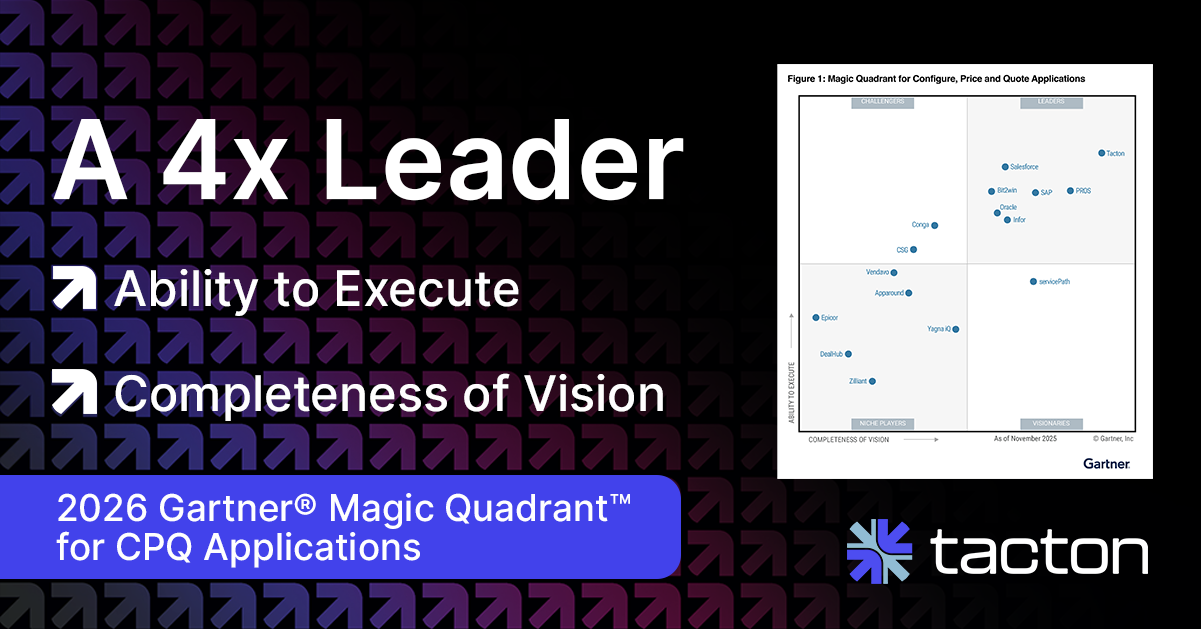
With Tacton, manufacturers can take control of their BOMs and their business. Tacton is an end-to-end manufacturing lifecycle platform that helps create a single source of truth for every product configuration and Bill of Materials, ensuring accuracy and alignment so that what you configure is valid and manufacturable. We’ve been named a Leader in the Gartner® Magic Quadrant™ for CPQ Applications three times, supporting complex manufacturers across the globe.  

Learn More About Tacton

Back to Resources

Tacton Insights & Analytics: Self-Service CPQ Analytics for Manufacturers

Tacton Insights & Analytics brings powerful, easy-to-use analytics directly into Tacton CPQ.

Tacton Insights & Analytics: Self-Service CPQ Analytics for Manufacturers

Manufacturers often lack the visibility into their data to move at the speed of business. In the case of sales and portfolio performance, CPQ holds unique and highly valuable data about how products are configured, priced, and sold; however, many teams rely on external BI tools or consultants, waiting days or even weeks for a single report. This creates IT bottlenecks and offers only fragmented insights.

Imagine being able to spot trends, bottlenecks, or revenue opportunities with just the click of a button. Tacton Insights & Analytics helps you leverage and act on CPQ data, visualizing deal data and user behavior through intuitive, embedded dashboards that enable better CPQ adoption and go-to-market decision making.  

Introducing Tacton Insights & Analytics 

Tacton Insights & Analytics is an analytics platform designed to unlock the value of CPQ data across sales, pricing, operations, and more. Unlike general-purpose BI tools, it’s embedded directly in Tacton CPQ, delivering near real-time visibility without IT requests or scattered reporting. 

Unlike ERP or CRM systems, Tacton Insights & Analytics helps you connect configuration and customer input data to sales and product performance—revealing insights no other system can—to give a clear view of how products are sold, configured, and performing. 

Tacton’s acquisition of Serenytics, an analytics company, strengthens our analytics and data visualization capabilities within Tacton CPQ. As the only analytics platform built specifically for CPQ in manufacturing, decision makers can easily access relevant data. Everything is self-service, accessible, and easy to act on within CPQ. 

What Tacton Insights & Analytics delivers  

With Tacton Insights & Analytics, manufacturers can maximize the full potential of their CPQ data across multiple applications. We’re starting with Behavior & Engagement Analytics, a free use case that comes standard with Tacton CPQ and gives every customer visibility into CPQ adoption, usage patterns, and opportunities to improve sales effectiveness. 

CPQ managers can instantly identify friction points or adoption gaps by user, region, or team without relying on IT. Meanwhile, CIOs benefit from reduced reporting requests and a scalable, low-maintenance way to deliver insights across the business. 

And this is only the beginning. More applications are coming soon under the Insights & Analytics umbrella, extending the power of CPQ data into sales, pricing, operations, and beyond. 

For organizations ready to go deeper, the first add-on—Portfolio Performance Intelligence—will provide insight into which product configurations succeed in the market, where complexity slows sales, and how to refine offerings for greater margin and efficiency. 

For customers who already rely on external BI tools, Tacton CPQ data can still flow seamlessly into those systems. The difference is that Insights & Analytics keeps everything in one place, so teams can analyze and act without ever leaving CPQ. 

Drive better business outcomes with CPQ data 

The true power of CPQ data comes when it’s applied directly to everyday decisions.  

Maximize CPQ adoption 

Analytics helps you see exactly how your teams are engaging with CPQ. Spot bottlenecks in usage, identify where quotes stall, and uncover where adoption may be lagging. With this visibility, you can provide targeted training, adjust processes, and ensure that every salesperson gets the most value from the platform. Higher adoption means faster, more accurate quoting and greater ROI. 

Optimize selling behavior 

Your CPQ data reveals powerful patterns in how deals are being structured. Are certain products consistently discounted? Are some configurations slowing down the quoting cycle? With insights into your data, you’ll align strategy, refine processes, and guide reps toward practices that improve win rates and profitability. 

Enhance product strategy 

Not all product configurations perform equally well in the market. Embedded analytics shows you which offerings resonate most with buyers and which create unnecessary complexity. Product managers gain a clear view of gaps, redundancies, or over-engineered options, allowing them to streamline portfolios, prioritize innovation, and boost margin. 

Accelerate time to decision 

Traditional reporting often means waiting days or weeks for IT or analysts to deliver insights. With analytics embedded in CPQ, those delays disappear. Teams can act directly from the insight, eliminating silos, reducing friction, and making decisions inside the same platform where their work takes place. Faster decisions ledas to faster results. 

Empower every role 

Tacton Insights & Analytics is designed for everyone, not just data experts. Prebuilt, drag-and-drop dashboards give immediate value, while no-code customization makes it simple for each team to tailor insights to their needs. Sales, product, operations teams, and CPQ owners all get the visibility they need, in language they understand, without relying on a data analyst. 

A bigger vision for your data  

Tacton Insights & Analytics is built as a scalable platform, with additional modules and applications coming soon to support a wider range of decision making across sales, pricing, operations, and beyond. 

Ready to see how embedded CPQ analytics can transform your business?  

Schedule Time With Us 

Back to Resources

How to Implement Self-Service Analytics in Manufacturing for Non-Technical Teams

Manufacturers are sitting on powerful data locked behind BI tools and IT requests. Learn how to amplify self-service analytics to accelerate smarter, data-driven decisions across the manufacturing lifecycle.

Share:

How to Implement Self-Service Analytics in Manufacturing for Non-Technical Teams

Acting on the abundant data manufacturers have, whether it’s win-loss data, product performance, or price sensitivity, is difficult when most users are not data scientists. 

Traditional BI tools and manual data analysis require technical consultants and IT dependencies, which places knowledge gaps firmly between your teams and faster opportunity creation. It also increases the workload for IT departments who field frequent requests to pull data. 

While BI tools and analytics APIs still hold their place, self-service analytics for manufacturing is now an essential avenue for IT teams to respond dynamically to the market. IT must invest in self-service analytics tools built for real users, and Configure, Price, Quote (CPQ) is an effective place to start, as it sits at the intersection of product and engineering, pricing, and sales. And next generation analytics tools are connecting easily accessible data across the entire manufacturing lifecycle.

Why embedded, use-case specific analytics tools accelerate insights 

Traditional BI tools require specialized skills in data modeling and maintenance. And while APIs provide flexibility, they often return raw, low-level data that non-technical users struggle to interpret.  

Modern self-service analytics embed data dashboards and visualization directly into the systems that your sales, engineering, or product teams use every day. They scale data access and also decouple data for specific use cases. For example, a self-service analytics tool may have specific use cases that analyze and drill down on product portfolio performance or order fulfillment activity.  

Why is this so important?  

Generalized data through APIs can be helpful for higher-level, technical analysis, but the benefit of use case-specific self-service analytics tools are two-fold.  

  • For teams, they focus the data in a way that makes it easy to manage and retrieve based on user roles and what’s most relevant to them.  
  • For IT teams, these system-embedded analytics tools (e.g., analytics embedded in CPQ) can optimize the specific data feed or source as well as the analytics tool itself, making the data analysis much richer. And with data coming directly from the system, you already have a data lake to work from without the need for consistent uploads.  


Instead of forcing IT to build and maintain dashboards from scratch, embedded and use-case-specific analytics bring structured, ready-to-use insights directly into the tools business teams already use. IT can still maintain control and governance while equipping non-technical business users to explore trusted data independently. 

The new generation of self-service analytics tools 

Self-service analytics refers to simplified, embedded, or low-code tools that allow non-technical users to visualize and act on data. They eliminate pesky dependencies and the need to create completely new tools.  

What makes the new generation different? 

  • New generation tools are built around pre-modeled data sets designed for specific manufacturing processes like quoting, configuration, and product performance. They offer no-code customization and easy shareability amongst and across manufacturing teams and functions. 
  • They combine data preparation, visualization, and export tools into a single, governed environment, so there is no need for separate BI licenses or external consultants. 
  • They offer extensibility (i.e., introducing additional external data) for IT through clean APIs and customizable data models. 

Self-service analytics vs. BI tools: finding the right balance 

It’s not necessary to choose entirely between one or the other, but often, there is a pushback when upsetting the current processes for analyzing data.  

“We already have BI tools. What makes this more insightful?”  

“We need flexibility and data control.” 

“APIs give us more freedom.” 

The answer is to keep them. Self-service analytics complements traditional BI by handling everyday operational insights directly within business tools. IT still has full oversight of data sources, permissions, and scalability while reducing manual requests. And, users will receive data that’s governed and contextualized, while IT can still manipulate raw data as needed.  

With the right balance, IT can focus on data strategy and governance (not dashboard maintenance) and empower business users to make faster decisions with only the most relevant data they need. 

What manufacturing teams can achieve today with self-service data analytics 

Using self-service analytics, your teams can start acting on data today to improve profitability, growth, and ROI for the company.  

Sales & Commercial Teams: 

  • Identify which configurations, channels, or regions drive the highest margins. 
  • Track quoting velocity and conversion to improve forecasting accuracy. 
  • Compare adoption and performance across direct and partner channels. 


Product & Engineering Teams: 

  • Analyze which features or configurations correlate with higher win rates. 
  • Detect trends that guide smarter assortment and pricing strategies. 


IT & System Administrators: 

  • Monitor user adoption, data quality, and engagement without building reports. 
  • Maintain centralized control of data governance while reducing recurring support requests. 
  • Extend data access through APIs when deeper enterprise integrations are required. 


These insights can happen in minutes, rather than weeks. For IT leaders and CIOs, their departments can focus on building a data-driven organization where teams understand performance metrics and align across functions. This pushes organizations toward greater data maturity, where there is a single source of truth and cross-functional data sharing that takes the organization from reporting to analysis.  

For example, a regional sales director compares recent quoting data and sees that configurations including optional service packages consistently deliver higher margins and faster approvals. Within minutes, she shares this insight with other teams, prompting sales reps to highlight those packages earlier in the sales cycle. It’s a small change that boosts average deal size without adding IT workload or waiting weeks for a BI report. 

The next step: bringing analytics closer to the source

As manufacturers look to extend digital transformation beyond engineering and production, CPQ is becoming a natural starting point for data-driven insights. Embedding analytics directly into quoting and configuration processes allows every team—from sales to engineering—to act on trusted, contextual data in real time.

At Tacton, we’re focused on helping manufacturers connect the dots between product, customer, and performance data. Want to see how analytics within CPQ can unlock faster, smarter decisions across your organization?

Learn More About Tacton’s CPQ Analytics 

Back to Resources

Symbolic AI in Manufacturing: The Key to Accuracy and Efficiency

Using rule-based logic instead of pattern-based guesses, symbolic AI ensures every product configuration is valid and manufacturable, so your business can quote faster, accurately, and profitably.

Symbolic AI in Manufacturing: The Key to Accuracy and Efficiency

To non-technical teams, the concept of AI in manufacturing is often imagined as an AI assistant or machine learning algorithm that outputs recommendations or recognizes patterns in data. But a lesser recognized and foundational type of AI, symbolic AI, helps manufacturers take control of increasingly complex products in a way that generative AI, machine learning, and other emerging forms of AI cannot. 

If you’re a manufacturer with hundreds of possible product configurations, symbolic AI is a powerful tool that uses rule-based logic to guarantee that impossible combinations cannot be configured.  

By preventing impossible combinations, your sales team builds correct configurations without requiring frequent engineering input. And that yields a faster, more precision-based operation.  

What Is Symbolic AI?  

Think of symbolic AI as a digital engineer or product specialist. It uses rules, logic, and your company’s human expertise to make decisions that are transparent and explainable. They come straight from the engineering data and logic that you currently use.  

In manufacturing, it means faster configuration and quoting and fewer errors without needing a data scientist to navigate the data.  

How Does Symbolic AI Work?

Symbolic AI is an approach that has existed for many years. While it’s quite different from machine learning and agentic AI, it’s just as essential in manufacturing processes and tools.   

Symbolic AI uses “if–then” rules or constraint-based logic instead of guessing based on patterns, as generative AI would. For example, constraints may look like: “If option A, then option B is required,” or “Option C and D cannot coexist”. By encoding certain constraints based on the knowledge of your engineers and product specialists, sales can configure or quote following the same logic. No missed dependencies. No rework. 

Consider truck manufacturers, for example. If payload capacity exceeds a set limit, symbolic AI automatically validates a reinforced chassis and upgraded suspension. Selecting an off-road model from a catalog ensures raised suspension and deep-tread tires. It can even validate specifications down to the nuts and bolts, so that every component, fastener, and fitting in the configuration can actually be manufactured. 

Why It Matters for Manufacturing

Manufacturing is full of rules. What parts fit together? Which features are compatible? Which designs meet regulations? 

Symbolic AI makes these rules digital and reusable, so teams don’t have to rely on dense spreadsheets and the limited availability of their engineers. For engineers who spent years studying their craft, it also means that they have the time to innovate rather than taking on the support role for sales.  

  • Sales or even self-service users can quote correctly the first time. 
  • Engineers have fewer last-minute design fixes. 
  • Operations deal with fewer production delays.  

Unlike machine learning, symbolic AI doesn’t need large amounts of data to work. It works with the expert knowledge you already have, so that knowledge is available in a more democratic manner across the manufacturing lifecycle.  

It’s especially valuable for complex, configurable products like trucks, industrial machines, or medical equipment, where one small mistake can cost thousands. 

How Symbolic AI Is Being Used Today in Manufacturing

Many manufacturers are using symbolic AI inside their CPQ (Configure, Price, Quote) or product configuration systems. For CPQ systems that use a constraint-based configuration engine, the ability to reason across thousands of interrelated rules means every product variation—no matter how complex—remains valid and manufacturable. Unlike simple “if–then” logic, which can quickly become unwieldy as options grow, constraint-based symbolic AI understands how each part, feature, and specification interacts with the rest. 

It may also be used in design validation, quality control, and digital twins to simulate and test product options automatically. 

This doesn’t mean, however, that investing in AI is one-or-the-other option between machine learning and traditional, symbolic AI. In fact, when combined, these two forms of AI create a more trustworthy, determinative solution.  

The Future of Symbolic AI

Symbolic AI is becoming even more powerful when combined with machine learning, creating “hybrid” or neuro-symbolic AI. In plain English, that means that systems can both learn from data and reason with rules, which connects the intuition of machine learning or generative AI with the logic of symbolic AI.  

For manufacturers, that could mean predictive systems that not only flag an issue but also explain why it happened and how to fix it. 

How Tacton Uses Symbolic AI  

Our constraint-based configuration engine applies engineering logic to every product choice, so that your manufacturing functions can be sure that what’s sold can be built, every time.  

By combining deep product knowledge with powerful AI reasoning, Tacton’s CPQ software helps manufacturers deliver accurate quotes while digitizing the knowledge of your product talent to future-proof your operations and instill customer trust.  

Schedule a Demo  

Back to Resources

How Manufacturers Can Advance Data Maturity and Uncover the “Why”

Industrial manufacturers are collecting more data than ever, but without cross-functional visibility and the ability to analyze intelligently, most insights remain reactive.

How Manufacturers Can Advance Data Maturity and Uncover the “Why”

Data maturity in industrial manufacturing is one of the greatest barriers to achieving more substantial efficiency both upstream and downstream. An immature data foundation is indicative of who will trail in AI adoption and automation or lose margin to poorly optimized processes and portfolio decisions.  

While leadership teams have plenty of data at their fingertips, their ability to act on that data is reactive, rather than proactive. And fragmented reporting means that manufacturers can only answer “what” happened but still struggle with the “why”. What manufacturers will need to accelerate maturity is the ability to retrieve, validate, and act on information in a centralized way.  

Data reporting is going digital, but not cross-functional  

Sales, engineering, and production teams understand the pain of making IT requests to retrieve specific data points, or waiting over a week to get the right report and share it with the right teams. In fact, 55 percent of sales and product reports are still generated manually, according to the Tacton 2025 State of Manufacturing report 

How is your sales and product data currently presented

Fortunately, this tide is changing as more manufacturers invest in dashboard tools, integrate systems with BI tools, or use embedded analytics within their CRM or ERP. The Manufacturing Leadership Council (MLC), in conjunction with Tacton, found that surveyed manufacturers may be more digitized in their reporting than previously thought.  

In the MLC and Tacton webinar, “State of Manufacturing: How Leaders Are Creating a Customer-Centric Smart Factory in 2025,” 31 percent of surveyed manufacturers were using limited dashboards, and 53% were using embedded analytics within systems like CRM or ERP. Yet only three percent had any advanced analytics capabilities.  

Though the shift from manual reporting to dashboards and embedded insights is promising, manufacturers are still only getting a handle on reporting. Where they fall behind is analyzing.  

What is the gap in data analysis?  

Reporting is easy with the right technology, but analysis is a strategic undertaking.  

Though teams may use their CRM’s analytics to see what it says about opportunities, for example, these metrics are not tied to the rest of their sales data. Analysis is completely siloed rather than cross-functional across sales, engineering, or supply chain. And it’s not systematic. 

This makes it nearly impossible to understand the “why” behind outcomes. Imagine in your CRM seeing that you have a 50% win rate for the same truck, at the same price point, across 10 customers. But why? Separate data on configuration will show that different customers have very different use cases—driven in snow versus desert conditions, for example. Getting data in a systematic way is the starting point to interpreting that data.   

The next layer of data maturity: reactive to proactive  

When you understand the “why” behind an outcome, you can proactively prevent or recreate that outcome. Now, you can use opportunity information to configure vehicle solutions that are optimized for customers in that snowy condition at the right price point. Or, you can tweak a product that’s not performing.  

Reports are just a reactive snapshot. A descriptive analysis. Predictive and prescriptive analysis tells you what will happen and what to do about it, based on trends that are visible and the connections made across functions. Centralized data that makes it easy for each function to work from a single source of truth allows these predictive and prescriptive insights to surface.  

Levers for achieving proactive and predictive analytics in industrial manufacturing  

Two strategies, which are not exclusive to each other, can make data maturity acceleration easier than ever.  

First, codifying end-to-end lifecycle data into a single platform or source of truth is essential. Sales data and configurations, engineering and product data, and fulfillment information embedded in a single platform, such as CPQ or a manufacturing lifecycle platform, makes cross-functional analysis possible.  

It also sets the stage for AI, the second lever. AI can turn fragmented, unstructured (and structured) data, such as emails or BOMs or quotes, into structured and actionable insight. When different types of AI are combined, it can also validate this data to ensure accuracy and trust. Using AI, you can accelerate data maturity and scattered data to create structured data with guardrails. 

Integrated data combined with generative AI capabilities takes manufacturers to that next layer. Then, when you make that data easy to access, share, and build in an embedded, intuitive system, decision making is sophisticated and proactive.  

How Tacton brings it all together 

Tacton helps manufacturers move from disjointed reporting to actionable insights by unlocking CPQ data in a single, intuitive platform. 

With Tacton, you gain visibility into how products are configured, priced, and sold, helping you identify performance drivers, growth avenues, and bottlenecks. 

In addition, AI capabilities ensure your teams are ready to move faster with your data. 

Schedule a Demo  

Watch the Full MLC + Tacton Webinar

Back to Resources

5 Pump and Fluid Handling Trends Driving Performance and Profitability

Pump and fluid handling manufacturers are rethinking efficiency through data connectivity, sustainability, and customer experience to drive smarter growth in the digital era.

5 Pump and Fluid Handling Trends Driving Performance and Profitability

Pump and fluid handling manufacturers are accelerating competitiveness through digital transformation. Advanced technologies, e-commerce-inspired buying experiences, and growing demand for energy efficiency are helping brands differentiate themselves, but ongoing trends reveal a common thread: connectivity. Pump manufacturers are linking data with predictability, sustainability with performance, and customers with real-time insight. These forces are catalyzing innovation and transforming go-to-market efficiency across the industry, and the way manufacturers will win is by bringing that same, efficient connectivity to their manufacturing lifecycle.

1. Adoption of digital twins in the pump & fluid handling market

The adoption of digital twins is changing how pumps and fluid systems are designed, sold, and serviced. A twin is a virtual replica of a pump or system that goes beyond CAD by integrating performance curves, materials, operating conditions, and live sensor feedback to mirror real-world behavior.

Adoption is accelerating as manufacturers link IoT data and physics-based simulation to improve reliability and predict maintenance. A recent collaboration between SPX FLOW and Siemens resulted in a digital twin of a mixing tank that uses CFD simulations, real-time industrial data, and flexible control modules. The collaboration demonstrates how virtual testing and optimization de-risk operations and speed improvement cycles for fluid processes that include pumps and valves.  

For commercial teams, digital twins are becoming powerful selling tools. When integrated into configuration and quoting workflows, they allow every quote to double as a performance simulation that validates duty points and helps sales teams demonstrate measurable value. This capability also powers new business models ,such as performance guarantees and pay-per-use contracts, which are increasingly common in utilities and process industries. 

A generational shift is amplifying this trend. The next wave of engineers and buyers—most of them digital natives—expect interactive product selection, 3D visualization, and instant feedback before engaging sales. Manufacturers that embed digital twin logic into their configuration tools and digital experiences stand out as more transparent and aligned with how modern buyers evaluate solutions.

2. Efficiency and sustainability as business drivers

As energy costs rise and environmental regulations tighten, pump and valve manufacturers are prioritizing efficiency as both an engineering and business imperative. According to the Hydraulic Institute, pump systems may account for up to 40% of industrial energy usage. Even a one- or two-percent gain in design efficiency can deliver enormous environmental and economic impact at scale.  

Advances in fluid dynamics and additive manufacturing, for example, are enabling progress by reducing leakage or power demand while extending product lifespan. Buyers now expect verified sustainability documentation as part of every specification, and metrics like carbon data or lifecycle energy are no longer nice-to-haves in the quoting process.

3. Reliability, uptime, and the total cost of ownership mindset

Reliability has become a currency of trust, and it’s the highest pain point for buyers of industrial products, according to Accenture. Buyers are looking beyond purchase price to the true economics of uptime and lifecycle performance. Smart pumps equipped with self-diagnostics, remote monitoring, and predictive analytics are minimizing unplanned downtime and optimizing service schedules. 

Manufacturers offering connected service models, where digital records and real-time insights support every installed asset, are using this to change their business model from product-focused to solution and outcome-focused. This evolution has made total cost of ownership (TCO) the metric that matters most in procurement, guiding decisions toward transparency and long-term value. 

In effect, the most competitive suppliers are providing continuous assurance that every pump in operation performs as expected, with data and service woven into the customer experience. Services and predictive maintenance are also becoming part of the buying process, as manufacturers shift to outcome-based solutions, rather than products alone. But they’re also ensuring that customers get more transparency and reliability in lead times and delivery, as well, which requires a connected experience from sales to production.  

4. Digital and e-commerce-driven procurement

Manufacturers and distributors are seeing double-digit growth in online sales channels as buyers increasingly adopt self-service quoting tools and digital comparison platforms. According to a recent study, e-commerce now represents approximately 13.4 % of total revenue in industrial distribution.  

Platforms designed for spare parts and mid-tier assemblies are increasingly integrating with enterprise procurement systems, making ordering faster and more transparent. At the same time, digital commerce is reshaping how buyers expect to engage with manufacturers. For example, Xylem, a global pump and water technology company, now offers an online catalog and purchasing portal where customers can easily browse, configure, and order pumps or consumables directly. This growing trends reflects how industrial buyers are seeking the same immediacy and convenience they experience in consumer e-commerce.

5. The move toward modular systems

A growing trend in the fluid handling industry is the shift toward modular, configure-to-order systems. Manufacturers are increasingly offering modular pumps, configurable manifolds, and quick-connect assemblies that allow plants to reconfigure or scale operations with minimal disruption. 

This modular approach supports agility in sectors such as pharmaceuticals, food processing, and semiconductors—industries where uptime and flexibility directly influence profitability. It shortens engineering cycles, simplifies maintenance, and reduces total lifecycle cost while improving responsiveness to fluctuating demand. 

When combined with digital twins and connected service data, modular systems can be used to deliver more adaptive industrial performance. 

Maximize efficiency to stay ahead of the market: who is Tacton?  

The pump and fluid handling industry is evolving toward connected, data-driven, and sustainable operations—and Tacton is helping manufacturers lead that change. Purpose-built for complex manufacturing, Tacton’s CPQ and lifecycle management solutions connect sales configuration, engineering, and fulfillment data to create a single source of truth. 

Leading pump OEMs and distributors trust Tacton to streamline every step of the customer journey. Discover how Tacton helps pump manufacturers turn complex products into connected customer experiences.  

Schedule a Demo  

Back to Resources

Generative AI vs. Symbolic AI in Manufacturing: Using Both to Build Trust

Trust in AI depends on explainability, especially when your operations are built on precision. Pairing symbolic and generative AI can help manufacturers build reliable solutions.

Generative AI vs. Symbolic AI in Manufacturing: Using Both to Build Trust

Nearly half of manufacturers are still exploring AI uses cases, with a minority successfully integrating AI into daily operations, according to a Tacton survey of global brands. Ask any manufacturing leader how their organization is integrating AI into their business, and you’ll hear similar sentiments about trust in AI.  

“It makes manual tasks so much faster, but we’re still trying to understand how to harness it correctly.”  

“The majority of our organization is curious about AI, but some are still hesitant. They don’t think that it should replace knowledgeable employees.”  

“AI is still a black box. We want to make sure we invest in a tool that’s reliable and doesn’t hallucinate results when our customers expect accuracy.”  

These are valid concerns in an industry where compliance, complexity, and accuracy factor into every decision. And, these reflections highlight a trend of manufacturers intrigued by AI’s potential but cautious about its reliability, according to a recent Tacton and Manufacturing Leadership Council (MLC) masterclass, “The State of Manufacturing: How Leaders Are Creating a Customer-Centric Smart Factory in 2025”. 

Building trust in AI as a workplace partner, especially in the order-to-delivery process, requires pairing human understanding and education with deterministic intelligence. 

You don’t lack data, you lack structured data 

There’s a common misconception that to successfully use AI, you must have better data—and more of it. “We’ll do AI later, after our data is perfect.”  

While clean data is vital (garbage in equals garbage out), Nils Olsson, Chief Strategy Officer at Tacton, challenged the thinking that data must be perfect.  

“The typical manufacturing company doesn’t lack data. It lacks structure,” stated Olsson. 

Data often lives in scattered silos, such as emails, spreadsheets, or the heads of veteran engineers and sales representatives. It may be inconsistent and lack guardrails for AI tools, like generative AI. But “deterministic” AI can bring structure and guardrails to that data when generative AI and symbolic AI work together.  

Generative AI vs. symbolic AI: demystifying the black box through multiple AI types 

How does this combination work?  

Generative AI in manufacturing learns patterns from large datasets. It synthesizes your unstructured data from emails, CAD notes, service logs, and more, and uses those patterns to surface insights, like optimal configurations based on a customer RFP, for example.  

However, generative AI alone can be prone to hallucinations, and without understanding the logic or reasoning behind it, AI can cause skepticism about its unpredictability.  

Symbolic AI, however, encodes expert knowledge, product logic, and engineering constraints into structured rules. As a type of AI used in technology for decades before AI’s recent propulsion, it helps validate and constrain what generative AI produces.  

As a result—and with the final validation of human expertise—manufacturers get explainable, trustworthy AI outputs and deterministic reasoning that comes from real-life engineering logic. This application is ideal for configuration, pricing, and quoting complex products quickly and accurately.  

Both types of AI alone have limits, but together, they help solve the trust problem and build confidence in AI-assisted user workflows. 

Accelerating AI maturity in manufacturing: strategies for leadership 

Despite its promise, manufacturers need not build proprietary large language models early.   

“Some companies are saying, ‘AI is so important, we’re going to build our own large language model.’ That’s extremely expensive. Why not start with the tools that are already available?” said Olsson.  

Start with small, practical, and safe applications first. Try applications that already exist. Even if your data is still messy, deterministic or rule-based AI systems can make it usable faster by enforcing logic, traceability, and consistency. That combination of symbolic and generative AI helps manufacturers move forward before achieving full data maturity, and every output can be verified against engineering, pricing, or product logic. 

Addressing internal skepticism 

Early success, however, depends as much on people as on technology. At JLS Automation, CEO Craig Souser described how his team addressed internal skepticism through education: 

“We have people that are interested but don’t really know where to start. And then we have the dissenters, who don’t believe AI technology is ever going to replace a good programmer.” 

To build confidence, JLS began with introductory sessions to get people comfortable with the base technology, starting small and demonstrating productivity gains in repetitive workflows.  

Building incremental success 

At Protolabs, Luca Mazzei shares a pragmatic approach to building AI maturity in manufacturing operations through incremental, explainable applications. 

“Even though we’re almost digital by design, we’re going through our own digital transformation. We’re expanding our purview from prototyping to short-run production,” Mazzei said. 

His team uses machine learning for pricing accuracy and efficiency while maintaining human oversight. Generative AI is used in customer service to help agents retrieve relevant, verified information from company systems. And, Protolabs is exploring how AI can read engineering drawings and digitize legacy parts data. 

These applications demonstrate that trustworthy AI starts small, with transparent logic and visible value. 

Build trust in manufacturing AI with Tacton  

Manufacturers that combine symbolic and generative AI are already shortening their path to AI maturity. 

Tacton embodies this hybrid approach within our configure, price, quote (CPQ) software and end-to-end lifecycle platform by offering deterministic, constraint-based configuration and pricing capabilities that seamlessly integrate symbolic AI with emerging generative AI technology. 

For manufacturers ready to move from experimentation to execution, Tacton provides the foundation for trustworthy and scalable AI transformation. 

Learn More About Tacton’s AI Solutions
Watch the Full Tacton and MLC Webinar 

Back to Resources

The CFO’s Guide to Protecting Profit Margins in Manufacturing

Manufacturers can lose as much as 80% of their margin between the quote and delivery. Here’s how CFOs can close that gap and turn visibility into lasting margin control.

Share:

The CFO’s Guide to Protecting Profit Margins in Manufacturing

As a CFO in manufacturing, you know the pressure when profits that look solid on paper shrink by the time the product ships. Some manufacturers lose 75–80% of their profit between order and delivery, not because of market swings, but because of breakdowns in execution. Sales, engineering, and fulfillment still operate on separate systems and truths, leaving gaps that digital transformation has yet to close.  

Some manufacturers focus on production maturity, including strengthening systems and manufacturing efficiency, while others chase growth through new digital customer experiences. Finance leaders are often forced to prioritize one function at the expense of the other. To truly protect manufacturing profit margins, however, CFOs must connect the entire manufacturing lifecycle through one digital thread. 

How CFOs must rethink digital transformation  

CFOs are no longer just financial stewards. They’re becoming the architects of connected enterprises. As manufacturers evolve, finance leaders are uniquely positioned to align commercial ambition with operational execution. Ultimately, if you want to grow a company and deliver profits, you need to ensure that what you sell will match up with what you deliver. 

As Nils Olsson, Chief Strategy Officer at Tacton, explained during a recent Manufacturing Leadership Council panel: 

“It’s not just about some lofty gains in terms of sales… it’s about how you make sure that you don’t lose half of the margins that you signed on for by the end of delivery of the product.” 

Great opportunity lies downstream. Digital transformation should not be a collection of isolated projects but a margin-protection strategy that connects quoting, engineering, and fulfillment in one flow of operational truth, which we like to refer to as the buyer-centric smart factory. When those functions share a single version of truth, what’s sold can be built profitably and delivered predictably. 

Start by asking: 

  • Where do digital investments today stop short of connecting sales and operations? 
  • Can finance see the profitability of every order as it moves through production? 
  • Do teams have shared definitions of cost, margin, and delivery feasibility? 

Where margin loss happens most 

“Eighty percent of the cost in any manufacturing company is typically coming from your production apparatus,” states Olsson.  

Margin erosion often begins after the signature. A deal closed at a 25% projected margin can drop to 15% after design changes or delays and sink further to 3% once warranty claims, penalties, and overhead are factored in. 

To stop this erosion, CFOs need visibility across the entire value chain. Systems should trace every quote to its actual fulfillment cost and highlight margin variance in real time. This visibility allows leaders to ask: 

  • Are quoted margins holding through production? 
  • Which configurations or product lines consistently drive rework or delay costs? 
  • Where are delivery issues or change orders triggering penalties? 

The deeper finance can get into the “why” behind these questions, the better positioned you’ll be to forecast accurately and prevent future losses. 

Engineering: the missing link in digital transformation programs 

“The secret sauce is engineering. How do you digitize and codify that knowledge?” says Olsson.  

By capturing and codifying engineering logic (i.e., the rules, constraints, and validations that define what can be built and at what cost), companies guarantee that every quote reflects operational reality. This alignment prevents costly rework and allows your finance team to forecast more accurately, since feasibility and cost structures are built into every deal from the start. 

Partner with engineering and IT leaders to identify how product rules, constraints, and cost structures can be digitized within configuration and quoting tools. Then, engineering knowledge becomes a shared, reliable foundation for decision making and collaboration between sales, product, and fulfillment. Support pricing and configuration tools that automatically validate lead times, material costs, and manufacturability so margin assumptions hold through delivery.  

Putting transformation into practice: additional steps for protecting manufacturing profit margins 

Protecting margins in manufacturing today requires both system integration and strategic focus. CFOs can take several practical steps: 

  • Build a single source of profitability truth. Integrate data from quoting, fulfillment, and financial systems so teams work from the same cost, price, and delivery assumptions.
  • Operationalize margin governance. Treat margin protection as a managed process. Create shared KPIs that tie directly to margin performance, such as quote-to-delivery variance, rework rate, etc. 
  • Use analytics to shift from reporting to prevention. Move from static quarterly reports to real-time analytics that surface cost variance, lead-time risk, and pricing pressure before they hit the P&L. Embedding analytics into the system will allow for more accurate forecasting and planning.  
  • Start focused, then scale. Begin with one high-leak area (i.e., a product line or region with recurring margin loss). Map out how quoting accuracy, production changes, and delivery costs affect actual profitability. Once improvements are proven, replicate the model across the enterprise. 

As Luca Mozzi, Head of Product and Pricing at Protolabs, noted, many manufacturers are pursuing digital transformation “because of uncertainty, not in spite of it.” Agile, connected systems allow companies to adapt pricing, production, and delivery to protect profit margins even in volatile conditions. 

Tacton’s end-to-end lifecycle platform for manufacturers 

Create your foundation for margin improvement in manufacturing with a system purpose-built for highly configurable solutions.  

Tacton’s platform brings together configure, price, quote (CPQ) capabilities with lifecycle-wide configuration management, order fulfillment, and installed base insight, all powered by real-time analytics. Together, these capabilities create a continuous digital thread that links what’s sold, what’s engineered, what’s delivered, and how it performs in the field. 

Our end-to-end platform includes: 

  • Configure, Price, Quote (CPQ) capabilities ensure every sale is feasible and margin-validated. 
  • Configuration lifecycle management maintains product accuracy and cost alignment as designs evolve. 
  • Connected order fulfillment: Validated configurations flow automatically into production to reduce rework, delays, or penalties. 
  • Lifecycle visibility: Installed-base data and performance insights help manufacturers deliver profitable service, upgrades, and compliance. 
  • Embedded analytics: Finance and operations share one source of truth, so margin protection is proactive. 

With this foundation, manufacturers can truly sell it right, build it right, and deliver it right every time. 

Explore how connected data and lifecycle intelligence can protect your margins and transform profitability. 

Learn More 

Watch the Full Webinar

Back to Resources

Why the Buyer-Centric Smart Factory Is the Future of Complex Manufacturing

Manufacturers face growing pressure to deliver highly configurable solutions on shorter timelines while protecting margins. The buyer-centric smart factory is the answer to delivering on your customer promise, profitably.

Why the Buyer-Centric Smart Factory Is the Future of Complex Manufacturing

Manufacturers of configurable products have the unique challenge of selling complex solutions amid growing demand to compress delivery timelines without losing margin. While the traditional factory is either built around mass standardization and high internal efficiency, or high customization with unpredictable delivery, the buyer-centric smart factory is where manufacturers will be able to achieve both customer satisfaction and efficiency. That means delivering on unique promises to their customers in a smarter, faster way.   

Tomorrow’s manufacturers must go from fragmented, reactive, and unsure, to unified functions, proactive data, and predictable business outcomes. The buyer-centric smart factory starts by meaningfully connecting the end-to-end process through a single source of truth.  

The challenging disconnects in today’s manufacturing model  

Today, manufacturing suffers from a disconnect. Buyer engagement happens in e-commerce sites or in conversations with sales teams who may be unclear if a solution is truly configurable. Engineering and product teams are checking for errors and handholding for quote accuracy. Order fulfillment is adjusting and re-forecasting supply chain needs.  

At each step, and with each competing priority, comes risk to profitability.  

This disconnect also shows up in what buyers experience: before purchase, they expect convenience and transparency, but once the order is placed, they demand reliability, quality, and predictable lead times. Manufacturers struggling with silos can rarely deliver both, and they often sacrifice margin or trust in the process. 

What is the buyer-centric smart factory? 

In the buyer-centric smart factory, the entire value chain works from the same source of truth.  

In an ideal setup, engineering centralizes rules for valid configurations, ensuring consistent product logic across PLM, ERP, and CPQ. Updates flow automatically to sales, preventing errors and protecting margins, while fulfillment receives automated BOMs, flexible scheduling, and order change management. The result is a seamless value chain where profitability is safeguarded end to end, reducing rework and avoiding costly delays that impact margin.

Defining ‘buyer-centric’ and ‘smart factory’ 

When broken down, what makes up the buyer-centric smart factory?

Buyer-centric engagement is where manufacturers are currently differentiating for today’s digital-first customers through:  

  • outcome-based configuration 
  • full solutions (i.e., both products and services) 
  • optimized pricing 
  • visualized buying 
  • automated compliance 

These experiences both fuel and are fueled by shared smart factory data, which includes data from digital twins, PLM, quote and order fulfillment, and supply forecasting.  

However, the buyer-centric smart factory adds two layers that make the connection truly work: 

  • AI to codify knowledge: Capturing engineering expertise and rules so sales can configure an optimized solution accurately and independently, while ensuring compliance and feasibility in real time. 

With a single source of truth, buyer demands flow directly into design, pricing (both products and services), and production. Customization is validated in real time—compliance checks, margin optimization—before an order hits the shop floor. And at every step, data and AI intelligence helps optimize the process.  

One source of truth leads to stronger business outcomes 

When organized effectively, a buyer-centric smart factory creates a seamless connection across the value chain. Sales can confidently deliver validated quotes and orders to fulfillment, while engineering can introduce and launch new products without delays to sales and order fulfillment. The result for the buyer is faster access to innovative products, with greater reliability and confidence in every purchase.

The benefits extend across the entire organization:

  • It’s easier for sales to sell complex products by codifying engineering knowledge and using that to guide selling.  
  • Codified product knowledge and AI make it easier to create the best possible solution for customers to increase win rates.  
  • Engineering has more time to innovate due to detailed and technically validated quotes.  
  • Order fulfillment has more reliability in forecasting and supply chain management and is able to deliver production excellence.  
  • Analytics and planning tools help manufacturers adapt to shifting demand without sacrificing margins. 

The key to achieving a buyer-centric smart factory 

For many manufacturers, achieving this level of efficiency requires breaking deep-rooted barriers between sales, engineering, and fulfillment through adjustments in people, process, and technology. 

Map workflows

It starts with mapping workflows and data to gather the necessary information from each of your systems. With the help of generative and symbolic AI, manufacturers can then determine what can and cannot be delivered based on that data. 

Create a seamless flow between Bill of Materials (BOMs)

In a buyer-centric smart factory, one of the most important workflows to automate is the transition from engineering design to manufacturing execution, specifically from the engineering bill of materials (eBOM) to the manufacturing bill of materials (mBOM). When the full 150% eBOM (representing all possible product variants) is digitized, each customer configuration can automatically generate a precise 100% eBOM that reflects the product exactly as sold. From there, a seamless connection between the quote and order fulfillment processes transforms that configuration into a production-ready mBOM, complete with the correct parts, routings, and work instructions for each factory’s supply chain and production setup. Achieving this level of automation requires a single source of truth that connects sales, engineering, and manufacturing.

Prepare cross-functional teams

But technology alone won’t solve the ‘people’ issue: resistance to change. Teams often cling to familiar processes, but cultural change is just as important as system change. Leadership and teams must reframe priorities so that sales, engineering, and fulfillment are not competing, but rather working toward the same customer outcomes.  

While it’s tempting to tackle challenges separately—pricing today, fulfillment tomorrow—priorities should be addressed together. When data, AI, and analytics are integrated on one platform, manufacturers can connect the front end with reliable fulfillment on the back end. Then, efficiency, profitability, and customer satisfaction stop being trade-offs and start reinforcing each other. 

Vision to reality with Tacton 

Moving from vision to reality requires the right platform to connect these moving parts in a data-driven way. 

Recognized as a leader in CPQ, Tacton is much more than CPQ. We provide an end-to-end manufacturing lifecycle platform that connects buyer engagement with the smart factory through a single source of truth.

CPQ remains a critical link, ensuring every configuration, price, and quote is validated and optimized. Through seamless integration with ERP, PLM, CLM, and other core systems, manufacturers can unify the value chain, streamline order fulfillment, and gain the data needed to innovate with confidence.

Schedule a Demo