Back to Resources

Tacton Named a Four-Time Leader in the Gartner® Magic Quadrant™ for CPQ Applications

Tacton’s perspective on the 2026 Gartner® Magic Quadrant™ for CPQ Applications.

Share:

Tacton Named a Four-Time Leader in the Gartner® Magic Quadrant™ for CPQ Applications

The Configure, Price, Quote (CPQ) industry standard is changing, raising expectations for innovation and dependable performance as businesses across industries look to compete on speed, accuracy, and even customer engagement.  

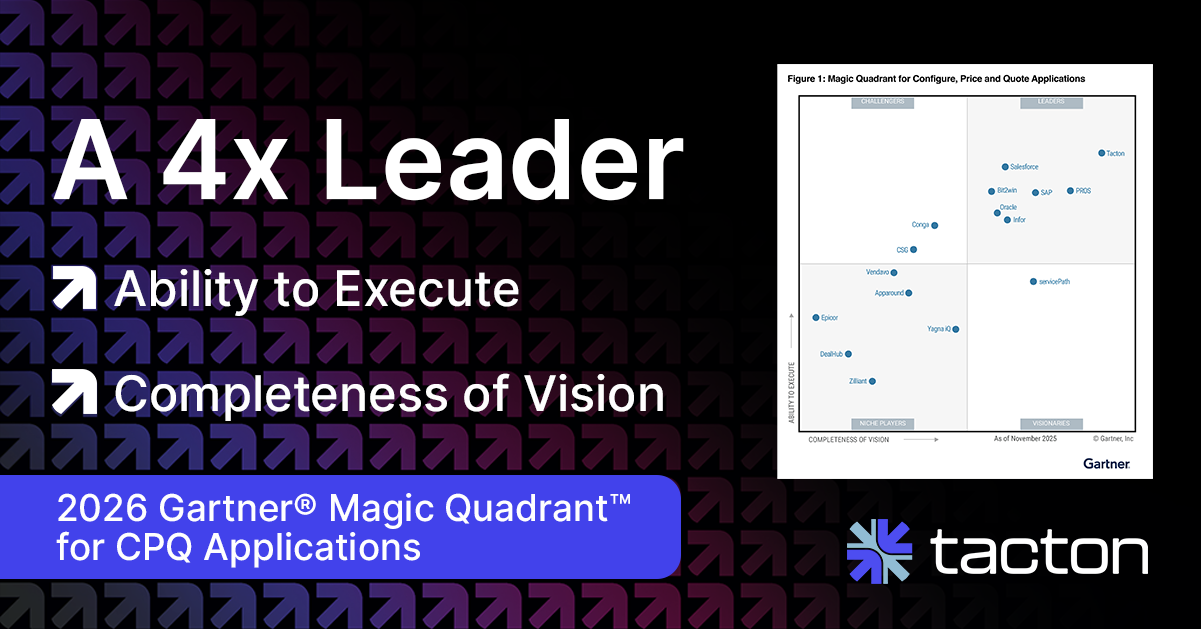
Tacton is proud to be recognized as a Leader in the 2026 Gartner® Magic Quadrant™ for CPQ Applications for the fourth year. We believe this recognition reflects CPQ’s central role in Tacton’s continued platform innovation and expansion, supporting how complex manufacturers sell and deliver highly configurable products with accuracy and control. 

2026 Gartner Magic Quadrant for CPQ Applications Tacton

CPQ in modern manufacturing: Why we believe the Gartner Magic Quadrant guides critical technology decisions 

Choosing the right CPQ for complex products is a highly consequential decision. Cross-functional silos, expanding product portfolios with high variance, digital-native buying expectations, and tighter dependencies between commercial and product teams all increase the risk of misalignment when CPQ is treated as a standalone quoting tool. 

We believe this is why structured, independent evaluation frameworks, such as the Gartner® Magic Quadrant™ for CPQ Applications, play an important role in how manufacturers assess CPQ platforms. Rather than focusing solely on individual features or short-term gains, these evaluations help organizations compare vendors based on their ability to execute today while continuing to evolve as requirements change. This year, Gartner evaluated 16 vendors for their Execution and Vision.  

From our perspective, this balance is especially important in 2026. Manufacturers are looking for CPQ solutions that can support ongoing innovation, integrate deeply into the manufacturing technology stack, and adapt to more advanced selling models without increasing complexity or risk. 

In this context, we believe Tacton’s positioning—furthest on both the Ability to Execute and Completeness of Vision axes—reflects our focus on delivering a manufacturing-ready CPQ platform built to manage complexity today and support what comes next. 

Our commitment in the manufacturing sector 

For us, recognition in CPQ starts with a deep understanding of how complex manufacturers operate and what it takes to sell highly configurable products accurately at scale. For over 26 years, we’ve worked closely with manufacturers to embed purpose-built CPQ deeply into their workflows and tech architecture, so configuration, pricing, and delivery stay aligned across the entire lifecycle. 

That foundation continues to shape how we evolve the Tacton platform. We’re expanding CPQ’s role beyond quoting to support analytics-driven insights, omnichannel selling, and emerging AI capabilities. These innovations help manufacturers improve accuracy, efficiency, and decision-making while avoiding additional complexity. 

Looking ahead, we are focused on delivering even greater value by connecting CPQ more meaningfully across sales, engineering, and manufacturing and fulfillment. By strengthening these connections, we aim to help manufacturers create a Buyer-Centric Smart Factory that connects selling, engineering, and manufacturing to deliver solutions quickly, reliably, and profitably to their customers. 

Download your complimentary copy of the 2026 Gartner ® Magic Quadrant ™ for CPQ Applications and find out why Tacton was named a Leader for the fourth time in a row. 


Gartner Disclaimer  
Gartner does not endorse any company, vendor, product or service depicted in its publications, and does not advise technology users to select only those vendors with the highest ratings or other designation. Gartner publications consist of the opinions of Gartner’s business and technology insights organization and should not be construed as statements of fact. Gartner disclaims all warranties, expressed or implied, with respect to this publication, including any warranties of merchantability or fitness for a particular purpose. 


This graphic was published by Gartner, Inc. as part of a larger research document and should be evaluated in the context of the entire document. The Gartner document is available upon request from Tacton. 
GARTNER is a registered trademark and service mark of Gartner, Inc. and/or its affiliates in the U.S. and internationally, and MAGIC QUADRANT is a registered trademark of Gartner, Inc. and/or its affiliates and are used herein with permission. All rights reserved. Gartner, Magic Quadrant for Configure, Price and Quote Applications, By Mark Lewis, Luke Tipping, 21 January 2026. 
Back to Resources

Enterprise CPQ for Complex Manufacturing: What It Takes to Scale Successfully

Enterprise CPQ goes beyond faster quotes. Build a scalable operating model that supports growth across your business.

Share:

Enterprise CPQ for Complex Manufacturing: What It Takes to Scale Successfully

How do global manufacturers scale product portfolios, regions, and sales channels in a controlled and repeatable way?  

The challenge often comes from inheriting dozens of pricing and quoting tools across regions—both manual and digital—when the goal is to keep everyone working from the same information. The best CPQ for enterprise manufacturers standardizes information into a single platform that is built to both, 1) handle growing interdependencies across products and options, and 2) reduce efforts to maintain and govern. Manufacturers that scale successfully at the enterprise level focus on the following CPQ capabilities and practices that support phased growth, governance, and ongoing change. 

What is enterprise CPQ and what makes it different? 

Enterprise CPQ is not simply CPQ used by large companies. It reflects a different set of requirements that emerge when manufacturing organizations operate across multiple product lines, regions, and sales channels. 

In enterprise manufacturing, CPQ must support more than fast quoting. It becomes a shared system of record for product configuration, pricing, and quoting logic across the business. That means accuracy, governance, and reuse matter as much as usability. 

What distinguishes enterprise CPQ is the scale of products, users, and change. Product portfolios evolve continuously. Pricing varies by customer, region, and contract. Quotes must work for internal sales teams, dealers, and engineers alike. At this level, CPQ must function as long-term infrastructure rather than a point solution. 

Enterprise CPQ also introduces operating-model questions that simpler implementations don’t face. Teams must decide where product logic lives, how changes are governed, how new regions or acquisitions are onboarded, and how to scale without duplicating rules or creating regional silos.  

For manufacturers evaluating CPQ for enterprise manufacturing, the real differentiator is whether the platform is designed to support phased rollout, shared ownership, and continuous expansion without losing control. 

What are the benefits of enterprise CPQ for manufacturers? 

At the enterprise level, CPQ delivers value well beyond faster quotes. When implemented and scaled effectively, enterprise CPQ helps manufacturers: 

  • Standardize configuration and pricing across the business while allowing regional and customer-specific variation. 
  • Scale products, regions, and channels without duplicating logic or creating silos. 
  • Reduce dependency on engineering and IT by separating technical constraints from commercial logic. 
  • Create a foundation for long-term growth, rather than a tool that needs to be replaced as the business evolves. 

3 critical capabilities for scaling CPQ and product sales 

Homegrown and simple CPQ platforms need substantial support from IT and consultants to keep up with growing product rule sets, fragile workarounds, and vendor interventions for changes. When selling highly configurable products, updating product models should be straight forward. When investing in long-term tools, it should be clear what investments are needed each year to keep up with technological innovation and new buyer needs.  

Yet, these tools often fail to meet the requirements of scaling companies with increasing sales model and channel complexity. The core requirements for CPQ for enterprise manufacturing then change.  

  1. Governance: who can change, update, or maintain the system safely and easily?  
  1. Reuse: How can modular models across product lines and divisions be reused in a standardized way, especially as possible configurations continue to grow?  
  1. Channel control: How can internal, partner, and customer channels work from a single operating model to ensure a consistent brand and sales experience?  

These questions are vital to scaling commercially, but there’s one more requirement that easily goes overlooked: ongoing innovation.  

Manufacturers who work with outdated and legacy tools eventually find that their original solution can’t adapt to new buyer needs or technology, and investing in constant innovation for their platform is costly and resource consuming.  

How to scale enterprise CPQ: best practices and what to look for 

As products, regions, and sales channels expand, CPQ must shift from a one-time project to a long-term operating model. 

The questions below reflect what enterprise teams ask when they think seriously about scaling CPQ, and how they can solve for these challenges.  

Can CPQ be implemented without a massive, multi-year project? 

Enterprise manufacturers often worry that CPQ will require a long, all-at-once rollout across every product line and region. In practice, that approach creates more risk, not less. 

The most successful enterprise CPQ programs start with a focused pilot. Teams choose one product line or region—often with medium complexity—to prove value quickly. This pilot establishes product models, pricing logic, integrations, and workflows that can be reused as the solution expands. Once the foundation is in place, additional product lines, regions, and channels can be added in parallel rather than treated as new implementations. 

What to look for in CPQ: 

  • Support for phased implementation and proof of concept pilots  
  • Constraint-based configuration rather than rules-based configuration for easy reusable product and pricing logic that doesn’t require hundreds more lines of rules for each new product 
  • The ability to expand without rebuilding core models 

How will CPQ fit into our existing CRM, ERP, and PLM landscape? 

Enterprise environments are rarely clean or static. Most manufacturers operate with multiple systems that vary by region and change over time. CPQ must work within that reality. 

Rather than relying on brittle, point-to-point integrations, CPQ should support a decoupled architecture. This allows enterprises to evolve their CRM, ERP, or PLM systems without breaking configuration or quoting processes. In practice, teams often prioritize the most critical integrations first—typically CRM and ERP—then extend to PLM, analytics, and other systems as the solution matures. 

What to look for in CPQ: 

  • Compatibility with middleware and enterprise integration strategies 
  • The ability to add or change systems without disruption 

Where should product and pricing logic live? 

As CPQ scales, unclear data ownership becomes a major source of friction. Enterprise teams need a clear separation of responsibility. 

A common best practice is to keep technical constraints (i.e., what can be built) in PLM, while managing commercial logic (i.e., what should be sold) in CPQ. This separation allows engineering teams to protect product integrity while sales and pricing teams control market-specific offerings, pricing structures, and approvals. It also reduces dependency on engineering for everyday commercial changes. 

What to look for in CPQ: 

  • Clear separation between technical and commercial logic 
  • Centralized governance with role-based control 
  • A single source of truth for configuration and pricing 

What happens when products, pricing, or rules change? 

Change is constant in enterprise manufacturing. New options are introduced, pricing updates occur, and components are phased out. CPQ must handle change without disrupting active sales processes. 

Enterprise-ready CPQ platforms provide version control, release management, and traceability. Teams should test changes in isolation, release them deliberately, and decide when existing quotes need to be revalidated. Updates should not automatically break open quotes or regional processes unless that is explicitly intended. 

What to look for in CPQ: 

  • Versioned product models 
  • Controlled release workflows 
  • Clear visibility into what changed and why 

How much effort does it take to maintain CPQ after go-live? 

Enterprise CPQ should be maintainable by a small, trained internal team. Product modelers, pricing administrators, and CPQ admins should handle most changes without heavy IT involvement or ongoing reliance on consultants. When every update requires external support, scalability suffers and costs rise. 

What to look for in CPQ: 

  • Low-code or no-code configuration tools 
  • Training that builds internal ownership 
  • An operating model designed for continuous growth 

How a global manufacturer approached CPQ standardization and scalability 

Xylem, a pump and flow technology manufacturer, operates globally with diverse products, regions, and sales motions. Like many enterprise manufacturers, they faced fragmentation across quoting and configuration tools—over 40 disparate tools, making it hard to deliver consistency and scale. 

In an effort to create a scalable and consistent CPQ process, Xylem created Solver, which uses CPQ as a single source of truth for its products across regions.  

Today, after consolidating their tools into one powerful selector and CPQ platform, they have: 

  • The ability to standardize core logic while allowing local flexibility. 
  • Support for multiple users, regions, and channels without rebuilding models. 
  • A foundation that could evolve with their business, not just solve today’s problems. 


Xylem’s experience reflects a common enterprise reality: CPQ is less about features and more about creating a long-term operating model for growth. 

Scale confidently with Tacton CPQ 

Enterprise CPQ success isn’t about speed and automation alone. It’s equally important to prioritize governance, reuse, and long-term ownership. 

Tacton CPQ is built specifically for complex manufacturers of highly configurable products. Our constraint-based foundation, phased rollout approach, and ability to evolve with your business needs allow you to expand across products, regions, and channels while keeping governance intact. That focus on long-term ownership—not just initial implementation—is why global manufacturers rely on Tacton as complexity and scale increase. 

Explore Tacton CPQ 

Back to Resources

Generative AI Best Practices in Manufacturing: The Dos & Don’ts for Smarter Quote-to-Order

Manufacturers are eager to adopt generative AI, but many still struggle with trust, risk, and realistic expectations. These practical guidelines help manufacturers avoid risk and set realistic expectations.

Share:

Generative AI Best Practices in Manufacturing: The Dos & Don’ts for Smarter Quote-to-Order

Manufacturers are keen to embrace generative AI, including large language models (LLMs), despite the many lingering questions surrounding how it works and how to safeguard inherent risks. Will AI fix your problems? Can you trust it? How much can you automate safely?

In manufacturing, many of these questions surface first in sales and quote-to-order processes, where AI is increasingly used to speed up configuration, pricing, and decision-making. However, the implications reach beyond sales.

Generative AI in manufacturing is powerful, but not limitless. It accelerates strong systems and clean data, but it doesn’t repair broken processes or replace the contextual experience of human beings.

These generative AI best practices, illustrated through the manufacturing quote-to-order and CPQ process, will help you avoid common pitfalls and clarify what AI can and can’t do across your broader manufacturing organization.

Data quality best practices: accelerating structure with AI

AI, especially generative AI and natural language processing, process a large amount of information to develop outputs. It can do things like: 

  • Accelerate model building when structured data already exists (and, in some cases, it can turn unstructured data into structured data for you).  
  • Extract patterns from clean, consistent product documentation. 
  • Reduce manual effort once data foundations are in place. 

However, it can’t fix poor data quality or missing product logic. It also can’t create a reliable output, such as a product model, from fragmented, conflicting, or inconsistent data.  

Do 

  • Know where your data comes from: Identify which systems (PLM, ERP, PIM, spreadsheets, documents) are the source for product, pricing, and rules so AI isn’t trained on conflicting or unofficial data. 
  • Establish a single source of truth: Decide which system owns each type of data and ensure AI outputs map back to that authoritative model instead of creating parallel versions. 
  • Define the target structure before using AI: Use AI to extract and organize unstructured data only when attributes, allowed values, units, and rule logic are already defined. 
  • Use AI to surface gaps, not hide them: Treat missing attributes, unclear rules, and low-confidence outputs as signals that data needs refinement before scaling. 
  • Validate AI outputs against existing rules: Ensure AI-generated models, configurations, or quotes always pass configuration, compatibility, and pricing rules before customer use. 
  • Consider unit and regional consistency: Inconsistent units, currencies, or regional standards (metric vs imperial, local certifications) are common failure points. 

Don’t 

  • Assume AI will resolve data ownership or consistency issues: AI cannot decide which source is correct when systems disagree. 
  • Treat extracted data as final: Information pulled from RFQs or documents must be normalized and mapped, not used verbatim. 
  • Skip validation because results look reasonable: Plausible outputs can still violate hidden constraints or edge cases. 
  • Don’t use edge cases and exceptions: AI performs best on standard cases. Rare exceptions should be clearly flagged or excluded. 

If your data foundation is incomplete or poor, AI will only amplify the problem.  

Transparency & oversight: generative AI can only assist

AI tools are incredibly powerful for suggesting models, product configurations, pricing, or predictive demand, but it can’t understand business context the way humans do. Though there is an opportunity for AI to eliminate unnecessary work, it shouldn’t be a replacement for experienced talent, but rather a tool to give them more time for strategy.  

Do 

  • Make AI-generated outputs clearly visible: Users should always know what was generated or suggested by AI so they can review, question, and correct it. 
  • Keep humans in the loop, especially early on: Use expert review during initial rollouts to catch errors, build trust, and train the system before scaling. 
  • Provide confidence or accuracy indicators: Show how reliable an AI output is so users understand when extra scrutiny is needed. 
  • Surface where AI struggled or made assumptions: Flag missing data, ambiguities, or inferred values instead of hiding uncertainty. 

Don’t 

  • Fully automate customer-facing decisions: Avoid letting AI finalize quotes, configurations, or recommendations without human review. 
  • Hide AI involvement: Presenting AI-generated outputs as human-created undermines trust and adoption. 
  • Treat AI outputs as authoritative without review: AI suggestions should be treated as drafts, not final answers. 

AI can recommend, but only humans can take responsibility. 

Implementation approach: Enabling focus

Generative AI in manufacturing speeds up repetitive, time-consuming tasks and supports internal teams by taking on the manual lift, so the business can scale. But it’s not something that can be globally adopted and scaled right away. It’s crucial to follow AI best practices that ensure your organization doesn’t jump the gun or act on unrealistic expectations.  

Do 

  • Start with internal use cases first: Use AI internally (e.g., engineering support, RFQ processing, model preparation) to validate accuracy and workflows before exposing it to customers. 
  • Focus on narrow, well-defined problems: Apply AI to very specific tasks like data extraction, draft model creation, or parameter identification rather than broad, end-to-end processes. 
  • Pilot, measure, then expand: Test AI on a limited set of products, track accuracy and exceptions, and refine before scaling. 
  • Standardize inputs to improve results: Consistent formats, terminology, and schemas reduce ambiguity and increase AI reliability. 

Don’t 

  • Treat Gen AI as a silver bullet: AI enhances existing processes but does not replace clear product logic, governance, or expertise. It can’t replace the knowledge that your teams possess around business context or commercial impact. 
  • Rush to customer-facing deployment: Exposing immature AI features risks errors, loss of trust, and rework. 
  • Expect near-perfect accuracy from day one: AI performance improves through iteration and refinement over time.  

Security & governance: generative AI can be safe if used correctly

 How do you process proprietary data without exposing it? Whether you’re using AI models you’ve built internally or using a third-party vendor, reading the fine print is one of the first steps in evaluating AI tools.  

Do 

  • Use AI vendors with explicit data protection guarantees: Confirm contractually that your data remains private, isolated, and protected within your environment. 
  • Ensure data is not used to train public models: Verify that proprietary product, pricing, and customer data is excluded from any shared or external model training. 
  • Understand data flow and access points: Know exactly where data is ingested, processed, stored, and accessed across systems and AI components. 
  • Involve legal and IT teams early: Align security, compliance, and governance requirements before AI is deployed, not after. 

Don’t 

  • Upload proprietary data into public AI tools: Public or consumer-grade AI platforms lack the controls required for sensitive manufacturing data. 
  • Assume all AI platforms follow the same standards: Security, isolation, and compliance vary widely between vendors and deployments. 
  • Skip governance discussions to move faster: Weak governance increases long-term risk and slows adoption when issues surface. 
  • Don’t treat AI-generated insights as exempt from compliance requirements: Outputs derived from regulated data may still fall under local laws, IP protection, or industry regulations. 

Use case selection: prioritizing for early wins

There are hundreds of ways to use AI in manufacturing, but not every use case is necessary for your business. AI can solve specific problems, but it shouldn’t be adopted for the sake of building a technologically advanced operation.  

Generative AI excels in a number of areas, including supporting guided selling workflows, building and defining products, analyzing performance data, etc. It can, however, be difficult to implement in high-risk processes.  

Do 

  • Use Gen AI for acceleration, screening, and preparation: Let AI handle early-stage work like data extraction, draft models, or RFQ triage so experts can focus on decisions. 
  • Apply AI where expert knowledge already exists: AI performs best when it’s reinforcing documented rules or proven processes. 
  • Treat AI outputs as starting points, not final answers: Use AI to generate drafts that engineers, sales, or product experts refine and approve. 

Don’t 

  • Deploy AI where errors have serious consequences: High-risk scenarios (safety, compliance, contractual commitments) require strict controls and review. 
  • Use AI without expert validation: AI cannot replace engineering or product judgment, especially in complex configurations. 
  • Don’t choose use cases with unclear ownership: If it’s unclear who reviews, approves, or corrects AI outputs, adoption will stall. 
  • Don’t pick use cases just because they sound impressive: Prioritize practical value over novelty. 

Change management: augmenting your people

AI can be a powerful tool for faster onboarding and workflow acceleration. When your teams have the resources, training, and confidence they need, they’ll be more likely to adopt these tools.  

Do 

  • Set realistic expectations about maturity and accuracy: Position Gen AI as an evolving capability that improves over time, not a finished or flawless solution. 
  • Communicate clearly what AI can and can’t do: Be explicit about where AI assists, what data and logic it’s working from, and where validation is required. 
  • Provide training and onboarding: Help users understand how to work with AI outputs and review them effectively. 
  • Address workforce concerns about replacement directly: Position AI as a tool that reduces manual effort and scales expertise, not one that replaces engineers, sales, or product experts. 
  • Listen to user feedback: Use real-world input to refine AI behavior, workflows, and trust over time. 

Don’t 

  • Oversell AI capabilities: Overpromising erodes trust and increases resistance when reality doesn’t match expectations. 
  • Expect immediate perfection: Early errors are part of the learning process and should be planned for. 
  • Ignore adoption and change challenges: Successful AI deployment depends on people, incentives, and workflows, not just technology. 

Continuous improvement: iterating through your evolution

AI will only continue to evolve, and if you’re working with AI-enabled tools, keeping up with new capabilities, regulations, and options is essential.  

Do 

  • Monitor AI outputs continuously: Track accuracy, exceptions, and confidence levels to ensure AI behavior stays aligned with business and product rules. 
  • Analyze recurring errors: Look for patterns in mistakes to identify gaps in data, rules, or prompts that need refinement. 
  • Refine prompts, data, and rules over time: Adjust inputs and guardrails based on real usage rather than one-time setup. 
  • Iterate based on real-world usage: Let how users work with AI guide improvements and prioritization. 
  • Stay informed on evolving AI capabilities and regulations: Regularly reassess tools and practices as models, compliance requirements, and enterprise standards change. 

Don’t 

  • Don’t position AI capabilities as static or “finished”: Messaging should reflect that AI evolves and improves, not that it’s fully complete. 
  • Don’t promise long-term behavior based on early results: Early performance does not guarantee future accuracy without ongoing refinement. 
  • Don’t reuse outdated AI messaging as capabilities change: Keep customer-facing and internal messaging aligned with current functionality. 
  • Don’t ignore regulatory or policy shifts: Compliance and governance expectations around AI will continue to evolve and must be reflected in both product behavior and messaging. 

The most successful manufacturers know AI’s limits

Generative AI delivers real value when your data is ready, your use cases are focused, and humans remain accountable. Following AI best practices helps manufacturers avoid unnecessary risk while unlocking meaningful efficiency gains. 

At Tacton, AI is built to strengthen your quote-to-order process. We integrate AI into our CPQ to help you accelerate RFQ-to-quote workflows, support product modeling, and validate configuration of highly complex products. AI works alongside your existing product logic and expert knowledge, not around it. 

If you’re exploring AI, consider how AI can elevate your CPQ strategy, and how it fundamentally shifts how your teams deliver value.  

Download the AI ebook 

Back to Resources

How to Respond to Manufacturing RFQs Faster with AI Sales Assistance

RFQ response time is now a competitive differentiator for customers who expect a fast and seamless buying experience. AI sales assistance can transform how manufacturers respond to high RFP volume.

Share:

How to Respond to Manufacturing RFQs Faster with AI Sales Assistance

The competitor that makes it easiest to buy their product is the one who wins the customer. Speed and accuracy are key to making an RFQ response competitive, but this isn’t easy to accomplish as buyers seek more information and RFQs become more complex. Greater product variance, sustainability needs, lead times, services, and other configuration factors make it difficult for your sales team to manually respond to hundreds of RFQs while still recommending the best product for the customer’s needs.  

It’s no longer simply a test of price and product. RFQ response time matters as a key differentiator for your customer that, in turn, speeds up your sales cycle. And with generative AI in the configure, price, quote (CPQ) process, sales teams can process large RFQs and find manufacturable, validated solutions within minutes or hours.  

What buyers want in a “winning” RFQ response vs. what sales can deliver 

Detail makes for a good RFQ response, but this is difficult to do quickly. The manual RFQ-to-quote process requires your team to sift through and interpret large documents, then collaborate with engineering to find a manufacturable solution. This can take weeks in some cases.  

While CPQ software can accelerate quoting by digitalizing engineering rules and constraints and validating configurations for sales teams, much of the data in an RFQ is unstructured and still requires interpretation.  

Meanwhile, customers are looking for the following to evaluate RFQ responses:  

  • Speed to first credible response  
  • Configuration accuracy and solution completeness—no ambiguity  
  • Feasibility and compliance for highly configurable products in highly complex industries 
  • Clear assumptions and constraints  
  • Accurate pricing and lead times  
  • Visualization and other differentiating items, such as sustainability estimates 


In order to achieve this, sales teams need to automate the RFQ interpretation and configuration process.  

Can AI automate RFQ responses? How generative AI is accelerating winning RFQ responses  

Generative AI for RFQ response automation is an emerging tool that helps you interpret RFQ documents and turn that into a configurable solution. Think of it like a sales assistant rather than a full automation tool.  

Generative AI in CPQ can process unstructured data from documents like PDFs, emails, and more. Imagine a 50-page RFP that includes a mix of long-form technical descriptions and operating conditions, such as cold weather or high pressure. In that mix are some tables, some notes, and then a sales discovery transcript contains additional business context. The AI sales assistant then interprets that conditional language and translates it into configuration logic that is already embedded in your CPQ platform.  

What the AI outputs cannot do, however, is provide a final solution. An RFQ-to-Quote tool provides an early-stage, validated configuration and some alternatives, perhaps with a match percentage to help you gauge confidence in the solution. It cannot, however, provide the final solution. This is where your sales team provides control and contextual industry expertise.  

AI does not: 

  • Make final legal or contractual decisions 
  • Replace engineering authority 
  • Remove the need for final review and approval processes 


AI does: 

  • Reduce manual interpretation 
  • Increase consistency and speed 
  • Support better-informed human decisions 

Optimizing Your Solution with AI  

How do manufacturers propose better RFQ solutions while still maintaining efficiency?  

AI helps sales representatives move past simple requirement discussions and move towards solution-based discussions. Using AI assistance, sales can collaborate to come up with:  

  • Multiple viable options  
  • Faster delivery alternatives  
  • Cost-optimized configurations  
  • Options aligned to highest customer priorities  


Because AI helps you create early configurations aligned to constraints, price, and other factors within your CPQ, your sales teams now have more opportunity and time to speak to the business outcomes and value of your solution.  

The business benefits of AI-powered RFP-to-quote

AI delivers the greatest advantage in RFQ-to-quote automation for manufacturers seeing high RFQ volume, limited engineering capacity, and a strongly competitive market. For manufacturers with modular and CTO offerings, this is especially powerful.  

  • Less variability across RFQ responses: AI applies the same interpretation and configuration logic across RFQs, regardless of seller, region, or customer (with region and customer configuration logic still intact). In turn, you create a stronger, consistent brand experience.  
  • Faster sales cycles without cutting corners: AI reduces the time it takes to move from RFQ document to a validated, sales-ready quote. As a result, you can improve pipeline velocity and engage buyers earlier in solution discussions to increase your win rate.  
  • Faster reuse of logic, assumptions, and best practices: AI makes it easier to reuse proven configuration logic, pricing structures, and response patterns across similar RFQs, so teams benefit from this knowledge automatically.  
  • Reduced reliance on individual experts: Instead of depending on a few highly experienced engineers or sellers, AI helps standardize how RFQs are interpreted and configured to help onboard sales teams faster and increase engineering capacity when key people are unavailable.  
  • Built-in traceability from RFQ to quote AI supports clearer traceability between RFQ requirements, configuration decisions, and the final quote. This allows you to see how requirements were interpreted and provide stronger documentation for audits, internal approvals, or customer questions.  
  • Identified mandatory requirements for formal RFQ processes: AI helps surface mandatory, non-negotiable requirements and constraints early. This lowers the risk of disqualification in public tenders or formal RFQ processes and ensures compliance.  

What manufacturers need to successfully accelerate RFQ responses with AI 

AI can be a powerful advantage in RFQ-to-quote when it’s applied on the right foundation. Standalone AI tools are not equipped with the product logic and training as purpose-built, CPQ-embedded AI tools for manufacturing.  

Additionally, AI should not be a standalone quoting tool. Understanding how or why decisions are made is crucial in answering customer questions and instilling trust.  

To be successful, manufacturers should first have the following in place:  

  • A credible CPQ with digitalized product and manufacturing logic: AI works best when it builds on existing configuration rules, constraints, and validation logic. 
  • Validation of AI outputs: AI should accelerate interpretation and setup, while CPQ ensures the final configuration and quote are manufacturable and compliant. 
  • Secure handling of RFQ data. RFQs often contain sensitive commercial, technical, or regulatory information. AI must operate within enterprise-grade security and data governance frameworks. 
  • Clear ownership between sales and engineering: AI enables faster collaboration, but roles and approval steps still need to be defined, especially for exceptions.

Create winning RFQ responses faster with Tacton 

Tacton is an end-to-end manufacturing lifecycle platform and leader in CPQ, purpose-built for manufacturers selling complex, high configurable products. Our AI capabilities are grounded in proven CPQ foundations, using your existing product logic, constraints, and manufacturing rules to ensure every quote is feasible and defensible. That’s why leading manufacturers trust Tacton to sell smarter while maintaining accuracy, governance, and engineering confidence. 

See Tacton AI Solutions

Back to Resources

The Digital Thread in Manufacturing: Connecting Data Earlier Across the Lifecycle

By connecting customer intent and configuration data early to the product lifecycle, manufacturers extend the digital thread across sales, engineering, and production.

The Digital Thread in Manufacturing: Connecting Data Earlier Across the Lifecycle

A digital thread is a chain of connected data from engineering design through production and the serviceable life of a product. In a traditional view, the digital thread provides end-to-end traceability starting in engineering systems like CAD and PLM and continuing through delivery and aftermarket systems to provide the most up-to-date and accurate information to all functions. However, most conversations don’t include configuration, quoting, and customer intent, which happens earlier in the commercial lifecycle.  

Creating a digital thread in manufacturing requires a full view of the product lifecycle to capture and carry customer requirements, configuration logic, and engineering data forward as a single, continuous source of truth for the rest of the lifecycle.  

What is a digital thread in manufacturing?  

A digital thread provides continuity across each manufacturing function by connecting product lifecycle data and presenting it in the right context for each team. It’s achieved by properly integrating key design, manufacturing, and service systems, so that data is made available across these systems in the appropriate and most relevant format.  

Take the example of a manufacturer of customized industrial machinery that uses configure, price, quote (CPQ) to validate thousands of configuration combinations. Once the product is configured, a connected data framework allows systems to automatically generate engineering and manufacturing BOMs and documentation, which translates that CPQ quote data specifically for these departmental needs. This ensures the entire build process traces back to the original customer configuration and their needs. 

While a digital thread sounds similar to a digital twin, there are key differences.  

Digital thread vs digital twin: what’s the difference?  

A digital twin is a virtual representation of a specific product or process across its lifecycle. At its core, it’s a simulation used to understand how a physical product will perform, helping inform decisions in engineering, manufacturing, and service.

A digital thread, by contrast, is not a simulation. It’s a connected data framework that ensures consistent, accurate product information flows across all functions and systems involved in designing, selling, building, and servicing products. The digital thread provides the foundation that enables digital twin technology by making trusted lifecycle data accessible in the right context.

Critically, a complete digital thread needs to start earlier than engineering. By capturing customer requirements, configuration decisions, and commercial intent through CPQ, manufacturers create what can be thought of as an engagement twin—a digital representation of the configured solution that was actually sold. This engagement twin becomes the foundation of the digital thread, ensuring engineering, manufacturing, and service teams work from the same validated product definition throughout the lifecycle.

The benefits of the digital thread  

By creating a way for all teams—from customer-facing sales to services—to access crucial product lifecycle information, you can create efficiencies and optimize processes more effectively.  

The benefits of the digital thread include: 

  • Engineering time savings and faster quote-to-production: With validated, up-to-date product logic available to sales teams through CPQ, engineering spends far less time reviewing configurations. This frees engineers to focus on higher-value design and reduces quote-to-production cycle time.
  • Margin protection: Misalignment between what was quoted, what engineering interprets, and what manufacturing ultimately builds can hurt your profitability. A connected digital thread provides consistent, accurate data across every stage, catching discrepancies earlier in the manufacturing lifecycle. 
  • Error elimination: Traceability and connected data provides all teams with the most up-to-date information, so everyone works from the same data source even as changes are made. 
  • True traceability: By linking downstream performance, service or maintenance data, and lifecycle information back to the original sales configuration and requirements, the digital thread enables variant-specific insights and equips sales and aftermarket teams to identify upgrade and service opportunities.
  • Faster change order management: A connected digital thread synchronizes updates to product logic, engineering data, BOM structures, and manufacturing instructions across every system and team. When changes are made in engineering—such as redesigns, compliance updates, or new options—those updates flow to CPQ, ERP, and MES automatically. This reduces the risk of selling outdated configurations.
  • Scalability across partners: Your entire distribution network works from the same accurate, governed product logic for better consistency across regions and channels.  

Steps for establishing a digital thread across commercial, engineering, and production processes

In most digital threads, manufacturers begin by defining a product within CAD, PLM, and CAE systems to create engineering BOMs, drawings, and models. The thread is then built through integrations and structured product data. Via the PLM, product data is pushed to systems like the ERP and MES for costing, work instructions, and routing. From there, production can build the product and provide data to services teams through MES and quality systems.  

Commercial decisions aren’t traditionally part of the digital thread, creating information siloes that lead to incompatible product configurations in the sales process. So, how can you build a true digital thread that encompasses the full lifecycle?  

  • Build a centralized product configuration model. Define options, rules, constraints, BOM logic, and dependencies into a single, authoritative model.
  • Map the configuration model to lifecycle systems. Connect commercial tools like CPQ, PLM, ERP, and MES so they interpret the same configuration definitions without duplicate rule sets or manual translation.
  • Orchestrate data flow across systems. Establish structured integrations so configuration data flows automatically into engineering and manufacturing systems and returns lifecycle data back upstream when needed.
  • Connect configuration decisions to engineering data.Connect commercial configuration decisions directly to engineering systems, so selected options and constraints automatically drive CAD models, variant-specific EBOMs, and engineering workflows. This ensures engineering works from the same validated product definition that was sold, without manual reinterpretation.
  • Maintain synchronized BOM structures. Ensure eBOMs, mBOMs, and commercial BOMs remain coordinated as constraints or engineering definitions change.
  • Automate lifecycle transitions. Enable transitions from one part of the lifecycle to the next to follow defined rules and workflows instead of manual handoffs.
  • Implement change management. Propagate engineering changes, new rules, and product updates through all systems, so outdated configurations are never sold or built. 
  • Establish a standard configuration service for all channels. Expose validated configuration logic to all sales channels so every buyer interaction uses the same governed model.
  • Capture lifecycle data for traceability and feedback loops. Tie as-built, quality, and service data back to the original configuration and lifecycle definitions to improve future designs and customer engagement.
  • Govern variants across their full lifecycle. Manage how configurations are introduced, updated, retired, or replaced. 

Real-world examples: strengthening the digital thread with configuration

Manufacturers like Piab vacuum automation and lifting solutions and Vantage Elevator Solutions show how establishing a digital thread between commercial and design functions creates immediate, measurable results.

By establishing configuration as a governed source of product truth, Piab unified pricing, visualization, and ERP synchronization with engineering data. This enabled more than 40,000 self-service configurations per month and direct linkage of 58,000 configured items to product and engineering structures. The result was faster, more consistent quoting and a reliable handoff into downstream manufacturing systems.

Vantage Elevator Solutions achieved similar gains by connecting constraint-based configuration with ERP-integrated quoting. This eliminated unworkable designs, reduced turnaround times, and ensured that what was sold aligned with what manufacturing could build, removing costly manual interpretation between sales and engineering.

In both cases, extending the digital thread to configuration improved accuracy, scalability, and traceability at the front end of the lifecycle. Just as importantly, it creates a stronger foundation for future lifecycle connections, making it possible to feed fulfillment and service insights back into the thread over time and further strengthen decisions across the product lifecycle.

Connect data across your manufacturing lifecycle 

The digital thread needs to start earlier to truly eliminate quoting, engineering, and production issues. Manufacturers that connect CPQ, lifecycle management, and core operations get faster, more accurate and profitable outcomes. 

Tacton, the most complete end-to-end lifecycle platform for manufacturers, helps your teams create the continuity, accuracy, and configurability needed to deliver the right product every time. Explore how a smarter approach to configuration and data flow can strengthen your entire value chain. 

Learn More About Tacton  

Back to Resources

How Tacton’s 3D Product Configurator Solves These Manufacturing Sales Challenges

A 3D product configurator gives manufacturers a faster, more accurate, and more intuitive way to sell complex products by dynamically visualizing every configuration. Learn how Tacton's visualization capabilities embedded in CPQ accelerate your sales.

How Tacton’s 3D Product Configurator Solves These Manufacturing Sales Challenges

Highly configurable products are difficult to communicate, whether they’re being communicated from engineering to sales or from sales to the buyer. Buyers want convenience and ample information before they speak to sales, but more information upfront also makes the experience more complicated. Visual configurators and 3D product configurators create an intuitive experience, so that buyers can be sure they’re making the right decision despite your product’s high configurability.  

Visual configuration in Tacton CPQ (configure, price, quote) makes it easier to remove friction in the sales process and differentiate your buyer experience from your competitors. Learn how to tackle your common sales challenges with CPQ visualization tools.  

What Is Visual Configuration in Manufacturing? 

Visual configuration is an interactive product tool that is often part of the configure, price, quote process and software. Sometimes called a 3D product viewer or online product builder, it uses technology that allows sales and end-buyers to see the product they are customizing in real-time, including the variants, accessories, and even colors they choose. 

Tacton’s visualization and 3D product configurator is natively integrated within Tacton CPQ’s configuration engine, unlike third-party tools that require separate connections. The visualization tool uses augmented reality, scaling models placed in real environments via a QR code or mobile link. The AR changes dynamically, in real time as the configuration changes. 

Buyers can be sure they’re creating the right product with the right fit in their operational workspace, and they can manipulate the product (e.g., rotate, zoom, etc.) for more visual context. 

Visual configuration heavy vehicles

What is layout planning visualization? 

For space planning scenarios, visual configuration can also support layout planning, which allows users to upload floor plans, place multiple components in a space, and validate fit without involving engineering. Tacton’s layout planning capabilities, for example, are especially helpful for manufacturers selling construction or building materials or industrial equipment for factories, where procurement requires strong visualization.  

How 3D product configurators work  

A 3D configurator isn’t a standalone visualization tool. It renders a visual representation based on the same product logic, constraints, and configuration rules in the CPQ system.  

The system pulls parametric values and updates the 3D model using pre-prepared visual assets. Visualization supports simple, pre-defined parametric changes (such as length or height) when modeled in advance. CAD assets are used initially and converted to lightweight FBX models for Tacton ahead of time, and the visualization updates from these prepared assets. 

When a user selects an option, the CPQ’s constraint engine validates the choice and sends back: 

  • Allowed options 
  • Blocked/invalid options 
  • Updated price 

Static images generated from predefined 3D camera angles can be automatically included in the proposal. 

It’s important to remember that visual configuration supports guided, rules-based visualization for quoting and sales, but it’s not a replacement for CAD. It doesn’t provide the depth of engineering-level precision or fully dynamic parametric modeling. 

The manufacturing challenges that visual configuration helps solve  

Visual product configurators reduce sales friction and streamline the buyer’s decision making by solving for these common bottlenecks: 

Buyers don’t understand their options 

Many B2B buyers today are not technical buyers. They need to see the solution in order to understand what it looks like, how it fits, and whether it’s compliant in their space. Without seeing it, they may delay their choice or create scope creep as changes and add-ons are requested post-quote.  

A 2D or 3D product viewer removes ambiguity. It builds confidence in your buyer and empowers them with more information without overwhelming them.  

Sales struggles to communicate complex variants 

Not all sales reps are technical experts, either. It’s much harder to effectively sell capital equipment when relying on PDFs, static images, or CAD screenshots that may be difficult to understand. Work happens in motion, and being able to use 3D or augmented reality in your onsite meetings or sales conversations makes you look like an expert.  

Engineering is pulled into every quote early in the sales cycle 

Selling highly configurable products means that engineering is tightly involved, especially in custom, engineer-to-order products. That means engineers spend a large portion of their hours supporting sales with feasibility checks. Visual configuration that’s embedded in CPQ ensures only buildable configurations are visualized, and buyers, sellers, and engineers are not navigating unbuildable solutions. Instead, engineering can focus on CAD and design work for special projects and new models.  

Quotes are slow and error-prone 

The longer it takes for your team to provide a quote, the more opportunity a faster competitor has to win their business. Between lack of accuracy and long delays while sales and engineering communicate, a buyer can become uninterested.  

Visual configuration eliminates interpretation errors between sales and engineering as well. Engineering often has to interpret what the customer wanted. 

Visual configurators eliminate this by providing: 

  • A shared, visual “source of truth” 
  • Dimensions and components 
  • Automatically generated, validated BOMs and configuration data alongside the CPQ 

Buyers are not engaged 

Buyers want an easy, Amazon-like experience when they buy. Visual configuration is a valuable feature of an e-commerce or online sales experience, presenting products in a similar way that B2C buyers explore products online.

3D product configurators embedded in CPQ also give you the ability to take screenshots of visualizations and export them into engaging, visual proposals that make your business stand out and empower your customers with the confidence to buy.  

Sales and approvals require multiple stakeholders 

Visualization helps align diverse stakeholders early in the buying process. 

Decision-making and sales cycles becomes faster when all stakeholders can see the same configured product rather than relying on static descriptions or assumptions.  

This is especially valuable when procurement requires input from operations, engineering, finance, facilities, safety teams, surgeons or medical staff in medtech equipment, dealer networks, or IT.  

Customization comes at the cost of efficiency 

Manufacturers want to sell customizable products without becoming engineer-to-order on every deal. With modular product models, you can standardize configurable options, present them visually, and keep customization and variability under control. This supports mass customization at scale.  

Sales onboarding takes too much time 

Visual configuration equips your sales reps, dealer reps, and new hires, so they can provide more information with less knowledge. 3D visualization, for example, dramatically reduces onboarding time, as valid configurations are automated, and ensures quoting consistency.  

Dealers and partners don’t have strong customer-facing tools 

Dealers are often stuck with outdated tools that don’t highlight your brand the way you need. A customer-facing product demo with interactive visuals is a major differentiator for your sales partners. Tacton’s visual configurator works in dealer portals and self-service omnichannel sales, so your distribution network can streamline sales of your products.  

How to implement visual configuration: what manufacturers need to know 

  • Prepare CAD data: Ensure clean, simplified visual assets and CAD models for the products you want to visualize. Tacton reuses your existing CAD, rather than requiring rebuilds.  
  • Connect CAD to CPQ rules: Link CAD parameters to your product logic so the 3D model always reflects a valid configuration. Tacton keeps everything aligned in one product model. 
  • Convert and optimize 3D assets: CAD files are transformed into lightweight, web-friendly geometry for fast loading and real-time updates. 
  • Configure the visual experience: Define how the model behaves during configuration, such as what updates dynamically, what moves, and what customers can interact with. 
  • Deploy in the cloud: Tacton’s SaaS platform manages hosting, scaling, and asset storage automatically, with optional PLM/PDM integration to keep models up to date. 

Visual product configuration is becoming a standard 

With automated drawings, error-free quotes, and a buying experience that sets you apart, Tacton helps you accelerate sales while removing friction across engineering and operations. If you’re ready to reduce rework, protect margins, and bring your complex products to life for your buyers, learn more about our buyer engagement capabilities.  

Learn More About Tacton Buyer Engagement

Back to Resources

Tacton Behavior & Engagement Analytics: Unlock CPQ ROI and Better Sales Performance

Strong CPQ adoption drives real ROI. Tacton Behavior & Engagement Analytics provides CPQ usage dashboards directly in the platform to track user behavior and uncover opportunities to improve performance.

Tacton Behavior & Engagement Analytics: Unlock CPQ ROI and Better Sales Performance

Companies deploying CPQ solutions report an average of $6.22 returned for every $1 invested over a three-year span and yield an average ROI of 121%, according to Nucleus Research 

That level of ROI, however, is only achievable when your CPQ usage is firing on all cylinders. 

You invest heavily in your CPQ. Implementation and realized business impact can take several months and hundreds of thousands of dollars. Without insights into user behavior and CPQ adoption, CPQ managers can’t see adoption shortfalls that lower win rates, and IT leaders are delegating essential team hours and resources to address data requests.  

Tacton Behavior and Engagement Analytics is a CPQ usage analytics dashboard tool that simplifies visibility into CPQ adoption and user engagement, directly within Tacton CPQ. Tool owners can identify bottlenecks and issues early to determine the best course of action, so they can enhance performance across the organization and improve time-to-productivity.  

What is Behavior & Engagement Analytics? 

Available for free to all Tacton users, this CPQ behavior analytics tool helps your teams get the most from your CPQ without custom coding or heavy IT requirements. Pre-built dashboards, flexible filters, and automatic adoption alerts allow users of any technical level to get immediate visibility into a number of metrics across teams, regions, and channels.  

Tacton CPQ owners and admins can use these dashboards for the following:  

  • Early intervention: Historical trends reveal where CPQ usage begins to decline across sales, partner, or engineering roles. System owners can act before adoption problems impact quote volume or accuracy by adjusting workflows or reinforcing enablement. 
  • Targeted training: Low-adoption users or roles are automatically flagged for review. Admins can use this data to focus training efforts where they’ll have the most impact, ensuring teams understand how to create proposals effectively. Doing so results in improved productivity and faster onboarding for new or underperforming users. 
  • Cross-team benchmarking: Compare adoption across sales teams, business units, or regions using built-in filters. Identify where engagement is strongest and where additional support or best-practice sharing is needed to replicate high-performing teams’ behaviors and close adoption gaps across the organization. 
  • Self-service rollout tracking: When a new self-service channel is introduced within Tacton CPQ (i.e., customers or partners to configure products and request quotes directly), system owners can monitor how many configured products, shopping carts, and proposal documents are created and enable faster validation of digital initiatives and data-driven improvements to self-service performance. 


“When implementing a CPQ, it’s mainly about the users and efficiency, but that means users are creating a lot of valuable data. It’s really important to have good analytics capabilities to get insights from this,” states Patrik Östberg,  SVP of Product Management at Tacton. 

How to track CPQ adoption using Behavior & Engagement dashboards 

The Behavior & Engagement Analytics dashboard is easy to use and understand for any user, from a seasoned manager to a new sales rep with no technical expertise required. 

Users can effortlessly navigate a variety of charts and CPQ user adoption metrics, including:  

Created content by object type 

Created content graph Tacton Behavior & Engagement Analytics
This chart shows how many CPQ objects (e.g., accounts, opportunities, shopping carts, and completed solutions) have been created across your company and its sub organizations. For example, an uptick in shopping carts can indicate strong self-service adoption, while steady opportunity creation points to healthy engagement from internal sales. This view makes it easy to compare activity levels and track adoption across roles, business units, and stages of the buyer journey.  


Proposals and firm proposals over time 

Total proposals Tacton CPQ Behavior & Engagement Analytics
This visualization tracks both total proposals and firm (submitted) proposals over time. It reveals trends in quoting activity and helps spot periods of high or low engagement. Comparing proposal creation to submission rates can surface potential bottlenecks, and low proposal creation could hint at adjustments that should be made within Tacton CPQ to further enable your teams.  


Configured products by channel 

Configured Products by Channel Tacton Behavior & Engagement Analytics
This chart breaks down the number of configured products created across direct, partner, and self-service channels. It shows, for example, who is performing the most configuration lift—your customers or your sales teams? This insight helps teams measure the effectiveness of new digital sales channels and assess where additional enablement or automation could drive greater efficiency. 


Registered and active users 

Registered and active users Tacton Behavior & Engagement Analytics
This section tracks the number of registered and active users each month, with filters by role, internal vs. partner, and region. It gives CPQ administrators a clear picture of platform adoption across the organization and helps identify where engagement is strong versus where additional onboarding or communication might be needed. 

Last usage by user 
Highlight when each user last interacted with Tacton CPQ, flagging in red any users who haven’t logged activity. It enables early detection of disengaged users so system owners can intervene before adoption drops further or productivity is affected. 

All dashboards can be filtered, drilled down to different sub organizations or roles, and exported as detailed reports, making it easy to share insights with leadership, training teams, or partner managers. 

Get the transparency you need to improve CPQ user adoption 

Tacton makes your CPQ data readily available without the need to navigate complex BI tools or data lakes. With Tacton Insights & Analytics, your data is accessible directly within your Tacton CPQ.  

Behavior & Engagement Analytics is the first step in Tacton’s new Insights & Analytics portfolio, which provides different analytics use cases as part of add-ons to your Tacton platform solutions. All Tacton users will receive Behavior & Engagement Analytics complementary as part of their solution, with additional analytics use cases available as optional extensions.  

Request a Demo  

Learn more about the Insights & Analytics roadmap.  

Back to Resources

Bill of Materials (BOM): What It Is and How to Automate in Manufacturing

A Bill of Materials (BOM) is the foundation of every product you build. Learn how automation helps keep sales, engineering, and production aligned in manufacturing.

Share:

Bill of Materials (BOM): What It Is and How to Automate in Manufacturing

Every configurable product a manufacturer builds, from tractors and lifts to medical devices or conveyor belts, starts with a Bill of Materials. It’s the map by which production knows exactly what components are needed and what is being built. However, as products become more complex and configurable, the BOM can become a source of errors, misalignment, and costly delays for your organization. That’s why BOM automation is such an important part of the production process, not just for operations and order fulfillment, but for the seamless experience that it can provide buyers.  

What is a Bill of Materials (BOM) in manufacturing?  

A Bill of Materials, or BOM, is a comprehensive list of materials, components, subassemblies, and instructions that are required to manufacture a product, based on the configured needs of the customer. It tells you what is needed and how it will come together.  

There are different types of BOMs managed throughout the manufacturing lifecycle, each with the most relevant information for that team to fulfill the order.  

Types of BOMs 

Each type of BOM communicates information about the product based on what the user needs to know. When the different types of BOMs communicate with each other, manufacturers can seamlessly translate what is commercially sold to the design and materials needed from each individual factory site.  

Consider the different types of BOMs for an excavator, for example.  

Sales Bill of Materials  

The sales BOM represents the customer-facing product as it is configured to their needs, including features, options, and pricing rules.  

In an excavator, this may include the following:  

  • Base excavator model (e.g., EX2000) 
  • Engine option: Standard Diesel or Tier 4 Compliant 
  • Boom/arm options: Standard Reach, Long Reach, or Heavy Lift 
  • Track type: Steel, Rubber, or Hybrid 
  • Cab options: Standard, Premium (with HVAC and touchscreen controls) 
  • Add-ons: Hydraulic quick coupler, rear-view camera, telematics system 

This is often created with a configure, price, quote (CPQ) system or CRM, and when created correctly, gives a valid representation of what can technically be configured (i.e., what components and variants can be combined) and what is actually available. The sales BOM helps sales create a compliant, detailed quote and order for the customer.  

Engineering Bill of Materials  

Created in CAD and PLM systems by engineers during the design phase, the engineering BOM, or eBOM, represents the product structure as it is designed to ensure optimal functionality. When the product is updated or changed, the eBOM changes with it.  

For our excavator product, an eBOM may include:  

  • Hydraulic system assembly (hoses, valves, cylinders, pump) 
  • Chassis frame weldment 
  • Operator cab (frame, glass panels, wiring harness, seat assembly) 
  • Electrical system (main harness, fuses, sensors, control units) 
  • Engine and cooling subsystem (radiator, fan, alternator) 
  • Fasteners and brackets defined by engineering 
  • Part numbers, revision levels, and CAD file references 

However, an eBOM isn’t automatically buildable. This will depend on whether or not production and order fulfillment can reliably manufacture the product, and which materials are available. That requires a different type of BOM.  

Manufacturing Bill of Materials  

The manufacturing Bill of Materials, or mBOM, represents how a configured product is actually built in the factory or across factories. Often created with help from your ERP or MES system, the mBOM includes details like production routing, or how parts will be assembled and sourced, often based on production sequence. 

An mBOM for an excavator may include:  

  • Hydraulic system kit (assembled as a module before final installation) 
  • Cab assembly (with seat and wiring pre-installed for faster line integration) 
  • Weldment subassembly groups for undercarriage frame and boom arm 
  • Alternate parts for localized sourcing (e.g., regional hydraulic fittings) 
  • Packaging and material handling items (crating, labels, protective wraps) 

An accurate mBOM helps manufacturers better manage their supply chain and prevent errors between what is sold to the customer and what is actually delivered to the customer.  

Service Bill of Materials  

Many manufacturers sell services along with their capital equipment in order to own the full solution and its lifecycle. In that case, a service BOM is necessary to support after-sales service, spare parts management, and maintenance documentation. It’s often created using the mBOM, and a well-managed service BOM supports customer satisfaction, uptime, and lifecycle profitability 

For an excavator’s field service, that may include replaceable and serviceable parts, such as: 

  • Engine oil filter kit 
  • Hydraulic seal replacement set 
  • Electrical harness replacement 
  • Track tensioner repair kit 
  • Preventive maintenance schedule items (filters, belts, fluids) 
  • Updated component versions (e.g., revised control module) 

In addition to other optional BOMs, such as planning BOMs for demand forecasting, costed BOMs for pricing and cost breakdowns, configurable BOMs dynamically created in CPQ for engineer-to-order and configure-to-order products, these different types of BOMs each serve a unique purpose that keeps the value chain efficient and effective.  

The challenge with BOM management

With several different types of BOMs in manufacturing, governed by different systems and teams, it’s easy for errors to surface that hold up customer delivery and, ultimately, buyer satisfaction. But it also causes profit margin erosion as errors across the value chain impact supply chain, production rework, and even penalties.  

The most important challenge for manufacturers is synchronizing these BOMs. When they’re not properly translated from one to the other:  

  • Engineering changes don’t reach manufacturing in time. 
  • Quotes may include non-buildable configurations. 
  • Service teams struggle with incorrect part lists. 


In the current smart factory environment, where manufacturers aim to create a digital thread and a single source of truth, teams are increasingly focused on BOM automation and alignment. 

How to automate BOMs in manufacturing  

BOM automation eliminates manual translation between BOM types, e.g., from eBOM  to mBOM, by synchronizing data across PLMERP, and CPQ systems. Instead of manual updates, changes flow automatically to maintain design intent, manufacturability, and sales accuracy. 

BOM automation is the process of using integrated systems and rules-based logic to automatically create, update, and translate Bills of Materials. All systems essentially speak the same language, so that what is sold is manufacturable—and profitably so.  

But that means manufacturers must treat BOMs as living digital assets, rather than static spreadsheets. They must invest in data governance and collaborate across departments with a single source of truth for product and sales data.  

  • Step 1: Identify where your BOMs are created and stored (PLM, ERP, CPQ, spreadsheets, etc.) and document how data currently flows between them. Note any common errors, delays, or duplicated data.  
  • Step 2: Standardize your data, including how parts and versions are represented across systems, such as naming or labeling conventions.  
  • Step 3: Connect PLM (design), ERP (production), and CPQ (sales), so BOM data can flow seamlessly.  
  • Step 4: Define how data transforms between systems (e.g., which design parts roll up into manufacturing subassemblies), and automate validation so that a change in design is automatically flagged and updated.  
  • Step 5: Assign clear ownership for BOM accuracy and data flow. Implement version control, audit trails, and change management policies. 

These steps, with help from the right CPQ or lifecycle manufacturing platform, make BOM automation in manufacturing easier to implement.  

Master management of your Bill of Materials  

With Tacton, manufacturers can take control of their BOMs and their business. Tacton is an end-to-end manufacturing lifecycle platform that helps create a single source of truth for every product configuration and Bill of Materials, ensuring accuracy and alignment so that what you configure is valid and manufacturable. We’ve been named a Leader in the Gartner® Magic Quadrant™ for CPQ Applications three times, supporting complex manufacturers across the globe.  

Learn More About Tacton

Back to Resources

Tacton Insights & Analytics: Self-Service CPQ Analytics for Manufacturers

Tacton Insights & Analytics brings powerful, easy-to-use analytics directly into Tacton CPQ.

Tacton Insights & Analytics: Self-Service CPQ Analytics for Manufacturers

Manufacturers often lack the visibility into their data to move at the speed of business. In the case of sales and portfolio performance, CPQ holds unique and highly valuable data about how products are configured, priced, and sold; however, many teams rely on external BI tools or consultants, waiting days or even weeks for a single report. This creates IT bottlenecks and offers only fragmented insights.

Imagine being able to spot trends, bottlenecks, or revenue opportunities with just the click of a button. Tacton Insights & Analytics helps you leverage and act on CPQ data, visualizing deal data and user behavior through intuitive, embedded dashboards that enable better CPQ adoption and go-to-market decision making.  

Introducing Tacton Insights & Analytics 

Tacton Insights & Analytics is an analytics platform designed to unlock the value of CPQ data across sales, pricing, operations, and more. Unlike general-purpose BI tools, it’s embedded directly in Tacton CPQ, delivering near real-time visibility without IT requests or scattered reporting. 

Unlike ERP or CRM systems, Tacton Insights & Analytics helps you connect configuration and customer input data to sales and product performance—revealing insights no other system can—to give a clear view of how products are sold, configured, and performing. 

Tacton’s acquisition of Serenytics, an analytics company, strengthens our analytics and data visualization capabilities within Tacton CPQ. As the only analytics platform built specifically for CPQ in manufacturing, decision makers can easily access relevant data. Everything is self-service, accessible, and easy to act on within CPQ. 

What Tacton Insights & Analytics delivers  

With Tacton Insights & Analytics, manufacturers can maximize the full potential of their CPQ data across multiple applications. We’re starting with Behavior & Engagement Analytics, a free use case that comes standard with Tacton CPQ and gives every customer visibility into CPQ adoption, usage patterns, and opportunities to improve sales effectiveness. 

CPQ managers can instantly identify friction points or adoption gaps by user, region, or team without relying on IT. Meanwhile, CIOs benefit from reduced reporting requests and a scalable, low-maintenance way to deliver insights across the business. 

And this is only the beginning. More applications are coming soon under the Insights & Analytics umbrella, extending the power of CPQ data into sales, pricing, operations, and beyond. 

For organizations ready to go deeper, the first add-on—Portfolio Performance Intelligence—will provide insight into which product configurations succeed in the market, where complexity slows sales, and how to refine offerings for greater margin and efficiency. 

For customers who already rely on external BI tools, Tacton CPQ data can still flow seamlessly into those systems. The difference is that Insights & Analytics keeps everything in one place, so teams can analyze and act without ever leaving CPQ. 

Drive better business outcomes with CPQ data 

The true power of CPQ data comes when it’s applied directly to everyday decisions.  

Maximize CPQ adoption 

Analytics helps you see exactly how your teams are engaging with CPQ. Spot bottlenecks in usage, identify where quotes stall, and uncover where adoption may be lagging. With this visibility, you can provide targeted training, adjust processes, and ensure that every salesperson gets the most value from the platform. Higher adoption means faster, more accurate quoting and greater ROI. 

Optimize selling behavior 

Your CPQ data reveals powerful patterns in how deals are being structured. Are certain products consistently discounted? Are some configurations slowing down the quoting cycle? With insights into your data, you’ll align strategy, refine processes, and guide reps toward practices that improve win rates and profitability. 

Enhance product strategy 

Not all product configurations perform equally well in the market. Embedded analytics shows you which offerings resonate most with buyers and which create unnecessary complexity. Product managers gain a clear view of gaps, redundancies, or over-engineered options, allowing them to streamline portfolios, prioritize innovation, and boost margin. 

Accelerate time to decision 

Traditional reporting often means waiting days or weeks for IT or analysts to deliver insights. With analytics embedded in CPQ, those delays disappear. Teams can act directly from the insight, eliminating silos, reducing friction, and making decisions inside the same platform where their work takes place. Faster decisions ledas to faster results. 

Empower every role 

Tacton Insights & Analytics is designed for everyone, not just data experts. Prebuilt, drag-and-drop dashboards give immediate value, while no-code customization makes it simple for each team to tailor insights to their needs. Sales, product, operations teams, and CPQ owners all get the visibility they need, in language they understand, without relying on a data analyst. 

A bigger vision for your data  

Tacton Insights & Analytics is built as a scalable platform, with additional modules and applications coming soon to support a wider range of decision making across sales, pricing, operations, and beyond. 

Ready to see how embedded CPQ analytics can transform your business?  

Schedule Time With Us 

Back to Resources

How to Implement Self-Service Analytics in Manufacturing for Non-Technical Teams

Manufacturers are sitting on powerful data locked behind BI tools and IT requests. Learn how to amplify self-service analytics to accelerate smarter, data-driven decisions across the manufacturing lifecycle.

Share:

How to Implement Self-Service Analytics in Manufacturing for Non-Technical Teams

Acting on the abundant data manufacturers have, whether it’s win-loss data, product performance, or price sensitivity, is difficult when most users are not data scientists. 

Traditional BI tools and manual data analysis require technical consultants and IT dependencies, which places knowledge gaps firmly between your teams and faster opportunity creation. It also increases the workload for IT departments who field frequent requests to pull data. 

While BI tools and analytics APIs still hold their place, self-service analytics for manufacturing is now an essential avenue for IT teams to respond dynamically to the market. IT must invest in self-service analytics tools built for real users, and Configure, Price, Quote (CPQ) is an effective place to start, as it sits at the intersection of product and engineering, pricing, and sales. And next generation analytics tools are connecting easily accessible data across the entire manufacturing lifecycle.

Why embedded, use-case specific analytics tools accelerate insights 

Traditional BI tools require specialized skills in data modeling and maintenance. And while APIs provide flexibility, they often return raw, low-level data that non-technical users struggle to interpret.  

Modern self-service analytics embed data dashboards and visualization directly into the systems that your sales, engineering, or product teams use every day. They scale data access and also decouple data for specific use cases. For example, a self-service analytics tool may have specific use cases that analyze and drill down on product portfolio performance or order fulfillment activity.  

Why is this so important?  

Generalized data through APIs can be helpful for higher-level, technical analysis, but the benefit of use case-specific self-service analytics tools are two-fold.  

  • For teams, they focus the data in a way that makes it easy to manage and retrieve based on user roles and what’s most relevant to them.  
  • For IT teams, these system-embedded analytics tools (e.g., analytics embedded in CPQ) can optimize the specific data feed or source as well as the analytics tool itself, making the data analysis much richer. And with data coming directly from the system, you already have a data lake to work from without the need for consistent uploads.  


Instead of forcing IT to build and maintain dashboards from scratch, embedded and use-case-specific analytics bring structured, ready-to-use insights directly into the tools business teams already use. IT can still maintain control and governance while equipping non-technical business users to explore trusted data independently. 

The new generation of self-service analytics tools 

Self-service analytics refers to simplified, embedded, or low-code tools that allow non-technical users to visualize and act on data. They eliminate pesky dependencies and the need to create completely new tools.  

What makes the new generation different? 

  • New generation tools are built around pre-modeled data sets designed for specific manufacturing processes like quoting, configuration, and product performance. They offer no-code customization and easy shareability amongst and across manufacturing teams and functions. 
  • They combine data preparation, visualization, and export tools into a single, governed environment, so there is no need for separate BI licenses or external consultants. 
  • They offer extensibility (i.e., introducing additional external data) for IT through clean APIs and customizable data models. 

Self-service analytics vs. BI tools: finding the right balance 

It’s not necessary to choose entirely between one or the other, but often, there is a pushback when upsetting the current processes for analyzing data.  

“We already have BI tools. What makes this more insightful?”  

“We need flexibility and data control.” 

“APIs give us more freedom.” 

The answer is to keep them. Self-service analytics complements traditional BI by handling everyday operational insights directly within business tools. IT still has full oversight of data sources, permissions, and scalability while reducing manual requests. And, users will receive data that’s governed and contextualized, while IT can still manipulate raw data as needed.  

With the right balance, IT can focus on data strategy and governance (not dashboard maintenance) and empower business users to make faster decisions with only the most relevant data they need. 

What manufacturing teams can achieve today with self-service data analytics 

Using self-service analytics, your teams can start acting on data today to improve profitability, growth, and ROI for the company.  

Sales & Commercial Teams: 

  • Identify which configurations, channels, or regions drive the highest margins. 
  • Track quoting velocity and conversion to improve forecasting accuracy. 
  • Compare adoption and performance across direct and partner channels. 


Product & Engineering Teams: 

  • Analyze which features or configurations correlate with higher win rates. 
  • Detect trends that guide smarter assortment and pricing strategies. 


IT & System Administrators: 

  • Monitor user adoption, data quality, and engagement without building reports. 
  • Maintain centralized control of data governance while reducing recurring support requests. 
  • Extend data access through APIs when deeper enterprise integrations are required. 


These insights can happen in minutes, rather than weeks. For IT leaders and CIOs, their departments can focus on building a data-driven organization where teams understand performance metrics and align across functions. This pushes organizations toward greater data maturity, where there is a single source of truth and cross-functional data sharing that takes the organization from reporting to analysis.  

For example, a regional sales director compares recent quoting data and sees that configurations including optional service packages consistently deliver higher margins and faster approvals. Within minutes, she shares this insight with other teams, prompting sales reps to highlight those packages earlier in the sales cycle. It’s a small change that boosts average deal size without adding IT workload or waiting weeks for a BI report. 

The next step: bringing analytics closer to the source

As manufacturers look to extend digital transformation beyond engineering and production, CPQ is becoming a natural starting point for data-driven insights. Embedding analytics directly into quoting and configuration processes allows every team—from sales to engineering—to act on trusted, contextual data in real time.

At Tacton, we’re focused on helping manufacturers connect the dots between product, customer, and performance data. Want to see how analytics within CPQ can unlock faster, smarter decisions across your organization?

Learn More About Tacton’s CPQ Analytics 

Back to Resources

Symbolic AI in Manufacturing: The Key to Accuracy and Efficiency

Using rule-based logic instead of pattern-based guesses, symbolic AI ensures every product configuration is valid and manufacturable, so your business can quote faster, accurately, and profitably.

Symbolic AI in Manufacturing: The Key to Accuracy and Efficiency

To non-technical teams, the concept of AI in manufacturing is often imagined as an AI assistant or machine learning algorithm that outputs recommendations or recognizes patterns in data. But a lesser recognized and foundational type of AI, symbolic AI, helps manufacturers take control of increasingly complex products in a way that generative AI, machine learning, and other emerging forms of AI cannot. 

If you’re a manufacturer with hundreds of possible product configurations, symbolic AI is a powerful tool that uses rule-based logic to guarantee that impossible combinations cannot be configured.  

By preventing impossible combinations, your sales team builds correct configurations without requiring frequent engineering input. And that yields a faster, more precision-based operation.  

What Is Symbolic AI?  

Think of symbolic AI as a digital engineer or product specialist. It uses rules, logic, and your company’s human expertise to make decisions that are transparent and explainable. They come straight from the engineering data and logic that you currently use.  

In manufacturing, it means faster configuration and quoting and fewer errors without needing a data scientist to navigate the data.  

How Does Symbolic AI Work?

Symbolic AI is an approach that has existed for many years. While it’s quite different from machine learning and agentic AI, it’s just as essential in manufacturing processes and tools.   

Symbolic AI uses “if–then” rules or constraint-based logic instead of guessing based on patterns, as generative AI would. For example, constraints may look like: “If option A, then option B is required,” or “Option C and D cannot coexist”. By encoding certain constraints based on the knowledge of your engineers and product specialists, sales can configure or quote following the same logic. No missed dependencies. No rework. 

Consider truck manufacturers, for example. If payload capacity exceeds a set limit, symbolic AI automatically validates a reinforced chassis and upgraded suspension. Selecting an off-road model from a catalog ensures raised suspension and deep-tread tires. It can even validate specifications down to the nuts and bolts, so that every component, fastener, and fitting in the configuration can actually be manufactured. 

Why It Matters for Manufacturing

Manufacturing is full of rules. What parts fit together? Which features are compatible? Which designs meet regulations? 

Symbolic AI makes these rules digital and reusable, so teams don’t have to rely on dense spreadsheets and the limited availability of their engineers. For engineers who spent years studying their craft, it also means that they have the time to innovate rather than taking on the support role for sales.  

  • Sales or even self-service users can quote correctly the first time. 
  • Engineers have fewer last-minute design fixes. 
  • Operations deal with fewer production delays.  

Unlike machine learning, symbolic AI doesn’t need large amounts of data to work. It works with the expert knowledge you already have, so that knowledge is available in a more democratic manner across the manufacturing lifecycle.  

It’s especially valuable for complex, configurable products like trucks, industrial machines, or medical equipment, where one small mistake can cost thousands. 

How Symbolic AI Is Being Used Today in Manufacturing

Many manufacturers are using symbolic AI inside their CPQ (Configure, Price, Quote) or product configuration systems. For CPQ systems that use a constraint-based configuration engine, the ability to reason across thousands of interrelated rules means every product variation—no matter how complex—remains valid and manufacturable. Unlike simple “if–then” logic, which can quickly become unwieldy as options grow, constraint-based symbolic AI understands how each part, feature, and specification interacts with the rest. 

It may also be used in design validation, quality control, and digital twins to simulate and test product options automatically. 

This doesn’t mean, however, that investing in AI is one-or-the-other option between machine learning and traditional, symbolic AI. In fact, when combined, these two forms of AI create a more trustworthy, determinative solution.  

The Future of Symbolic AI

Symbolic AI is becoming even more powerful when combined with machine learning, creating “hybrid” or neuro-symbolic AI. In plain English, that means that systems can both learn from data and reason with rules, which connects the intuition of machine learning or generative AI with the logic of symbolic AI.  

For manufacturers, that could mean predictive systems that not only flag an issue but also explain why it happened and how to fix it. 

How Tacton Uses Symbolic AI  

Our constraint-based configuration engine applies engineering logic to every product choice, so that your manufacturing functions can be sure that what’s sold can be built, every time.  

By combining deep product knowledge with powerful AI reasoning, Tacton’s CPQ software helps manufacturers deliver accurate quotes while digitizing the knowledge of your product talent to future-proof your operations and instill customer trust.  

Schedule a Demo  

Back to Resources

How Manufacturers Can Advance Data Maturity and Uncover the “Why”

Industrial manufacturers are collecting more data than ever, but without cross-functional visibility and the ability to analyze intelligently, most insights remain reactive.

How Manufacturers Can Advance Data Maturity and Uncover the “Why”

Data maturity in industrial manufacturing is one of the greatest barriers to achieving more substantial efficiency both upstream and downstream. An immature data foundation is indicative of who will trail in AI adoption and automation or lose margin to poorly optimized processes and portfolio decisions.  

While leadership teams have plenty of data at their fingertips, their ability to act on that data is reactive, rather than proactive. And fragmented reporting means that manufacturers can only answer “what” happened but still struggle with the “why”. What manufacturers will need to accelerate maturity is the ability to retrieve, validate, and act on information in a centralized way.  

Data reporting is going digital, but not cross-functional  

Sales, engineering, and production teams understand the pain of making IT requests to retrieve specific data points, or waiting over a week to get the right report and share it with the right teams. In fact, 55 percent of sales and product reports are still generated manually, according to the Tacton 2025 State of Manufacturing report 

How is your sales and product data currently presented

Fortunately, this tide is changing as more manufacturers invest in dashboard tools, integrate systems with BI tools, or use embedded analytics within their CRM or ERP. The Manufacturing Leadership Council (MLC), in conjunction with Tacton, found that surveyed manufacturers may be more digitized in their reporting than previously thought.  

In the MLC and Tacton webinar, “State of Manufacturing: How Leaders Are Creating a Customer-Centric Smart Factory in 2025,” 31 percent of surveyed manufacturers were using limited dashboards, and 53% were using embedded analytics within systems like CRM or ERP. Yet only three percent had any advanced analytics capabilities.  

Though the shift from manual reporting to dashboards and embedded insights is promising, manufacturers are still only getting a handle on reporting. Where they fall behind is analyzing.  

What is the gap in data analysis?  

Reporting is easy with the right technology, but analysis is a strategic undertaking.  

Though teams may use their CRM’s analytics to see what it says about opportunities, for example, these metrics are not tied to the rest of their sales data. Analysis is completely siloed rather than cross-functional across sales, engineering, or supply chain. And it’s not systematic. 

This makes it nearly impossible to understand the “why” behind outcomes. Imagine in your CRM seeing that you have a 50% win rate for the same truck, at the same price point, across 10 customers. But why? Separate data on configuration will show that different customers have very different use cases—driven in snow versus desert conditions, for example. Getting data in a systematic way is the starting point to interpreting that data.   

The next layer of data maturity: reactive to proactive  

When you understand the “why” behind an outcome, you can proactively prevent or recreate that outcome. Now, you can use opportunity information to configure vehicle solutions that are optimized for customers in that snowy condition at the right price point. Or, you can tweak a product that’s not performing.  

Reports are just a reactive snapshot. A descriptive analysis. Predictive and prescriptive analysis tells you what will happen and what to do about it, based on trends that are visible and the connections made across functions. Centralized data that makes it easy for each function to work from a single source of truth allows these predictive and prescriptive insights to surface.  

Levers for achieving proactive and predictive analytics in industrial manufacturing  

Two strategies, which are not exclusive to each other, can make data maturity acceleration easier than ever.  

First, codifying end-to-end lifecycle data into a single platform or source of truth is essential. Sales data and configurations, engineering and product data, and fulfillment information embedded in a single platform, such as CPQ or a manufacturing lifecycle platform, makes cross-functional analysis possible.  

It also sets the stage for AI, the second lever. AI can turn fragmented, unstructured (and structured) data, such as emails or BOMs or quotes, into structured and actionable insight. When different types of AI are combined, it can also validate this data to ensure accuracy and trust. Using AI, you can accelerate data maturity and scattered data to create structured data with guardrails. 

Integrated data combined with generative AI capabilities takes manufacturers to that next layer. Then, when you make that data easy to access, share, and build in an embedded, intuitive system, decision making is sophisticated and proactive.  

How Tacton brings it all together 

Tacton helps manufacturers move from disjointed reporting to actionable insights by unlocking CPQ data in a single, intuitive platform. 

With Tacton, you gain visibility into how products are configured, priced, and sold, helping you identify performance drivers, growth avenues, and bottlenecks. 

In addition, AI capabilities ensure your teams are ready to move faster with your data. 

Schedule a Demo  

Watch the Full MLC + Tacton Webinar

Index